
Optimize speed and SEO with Page Speed Performance
SiteSkite’s built-in Page Speed Performance module monitors loading speed, responsiveness, and visual stability — fully aligned with Google’s Core Web Vitals. Track LCP, FID/INP, and CLS with actionable insights that impact SEO rankings, user experience, and site health across every linked WordPress site.
7-day trial · No credit card required
Why Core Web Vitals matter
Google uses Core Web Vitals as ranking signals. Better metrics mean better visibility, higher conversions, and fewer visitors bouncing before your page loads.
Higher SEO rankings
Core Web Vitals are direct ranking signals — improving LCP, INP, and CLS helps your sites compete in search results.
Improved user experience
Fast, stable, responsive websites increase conversions and reduce bounce rates — especially on mobile.
Agency-ready reporting
Show clients real performance improvements backed by verifiable Core Web Vitals data in PDF reports.
Faster troubleshooting
Identify exactly what’s wrong — slow server, large media, layout shifts, or interactivity delays — without guessing.
The three Core Web Vitals
Google’s real-world user experience metrics — each one measures a different dimension of how your site feels to visitors.
Largest Contentful Paint (LCP)
Measures loading performance — how quickly the main content becomes visible.
Good LCP means pages load fast and users see content quickly. Slow LCP leads to higher bounce rates.
FID / Interaction to Next Paint (INP)
Measures interactivity — how quickly the page responds to user actions.
Low delay means your site feels responsive. High delay feels sluggish and frustrating to use.
Cumulative Layout Shift (CLS)
Measures visual stability — whether elements shift unexpectedly while the page loads.
Low CLS keeps layouts stable. High CLS causes users to click wrong items or lose their place.
How SiteSkite helps improve Core Web Vitals
Continuous scanning, clear breakdowns, and reporting built into your WebOps workflow.
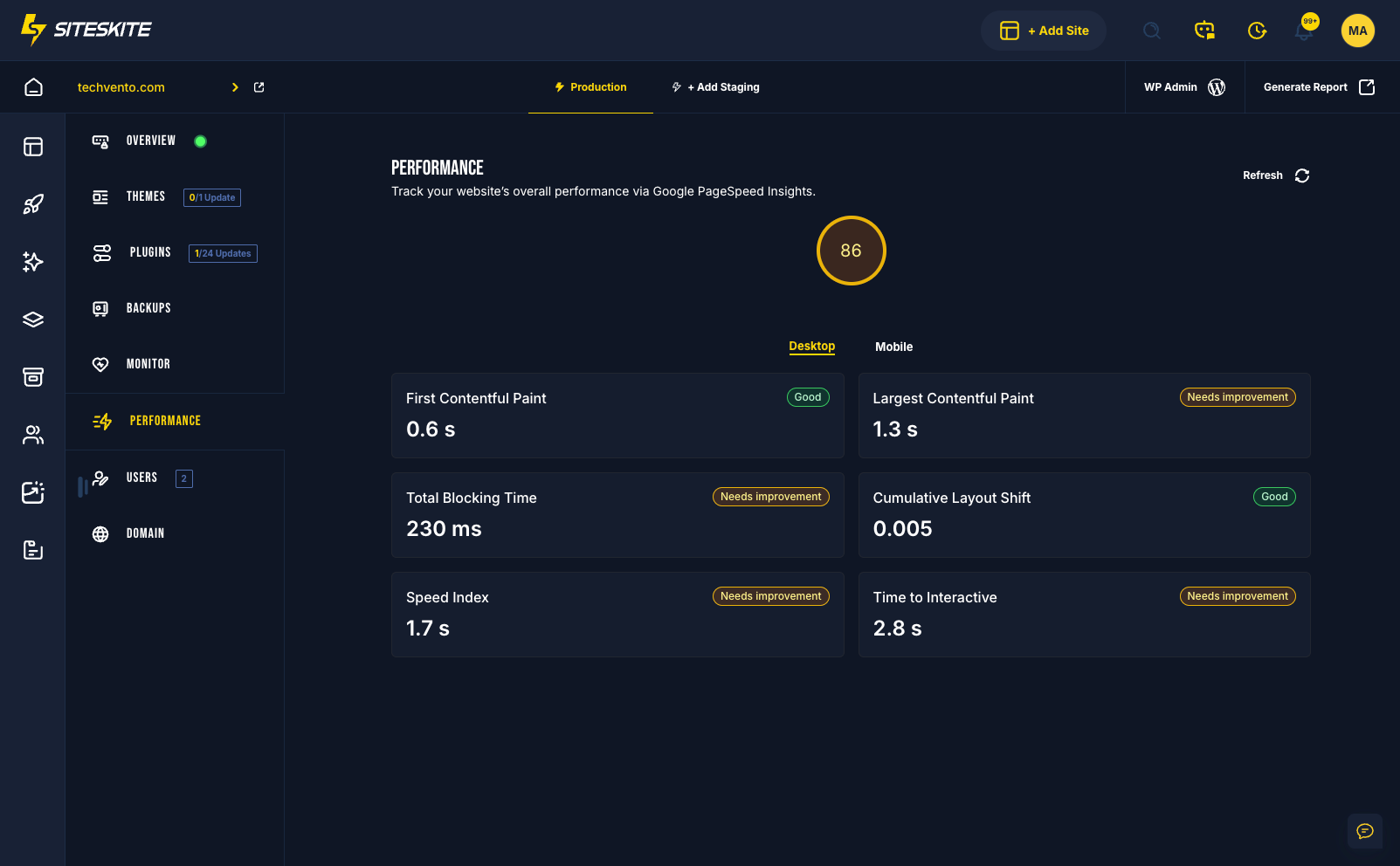
- Detailed performance breakdown — LCP, FID/INP, and CLS with Good, Needs Improvement, and Poor indicators
- Core Web Vitals included in downloadable PDF reports for clients
- Consolidated performance overview for single sites or hundreds of linked projects
- Performance tab per linked site with scores and recommendations
- Detect deeper structural issues early — slow server, large media, layout shifts
- Monitor alongside uptime, backups, and maintenance in one portal
Who is this for?
Page Speed Performance fits anyone who cares about fast WordPress sites and measurable results.
Agencies
Deliver monthly performance reports to clients with Core Web Vitals data they can understand and trust.
Developers
Optimize loading speed with clear metric breakdowns — know whether to fix server, assets, or front-end code.
Marketers
Track SEO-relevant performance signals and demonstrate improvement after optimization campaigns.
Business owners
Get a faster, higher-converting website without juggling separate PageSpeed tools for every site.
Multi-site portfolios
Review performance per linked site from SiteSkite — whether you manage one site or hundreds.
Maintenance workflows
Pair performance checks with SiteSkite Reports, Smart Engine, and monitoring for complete site health visibility.
Where to find Page Speed Performance
Review Core Web Vitals and recommendations from any linked site in the SiteSkite portal.
Open your dashboard
Log in to SiteSkite and navigate to your linked sites.
Select a linked site
Choose the WordPress site you want to analyze.
Open the Performance tab
View Core Web Vitals metrics, scores, and color-coded indicators.
Review and act
Use the breakdown to fix slow LCP, interactivity delays, or layout shifts — then track improvement over time.
Performance as part of site health
Core Web Vitals are one layer of a complete WebOps stack — use them alongside monitoring, reports, and maintenance.
Boost overall site health
Performance metrics help detect structural issues before they affect SEO and conversions.
- Track LCP, FID/INP, and CLS with clear Good / Needs Improvement / Poor labels
- Include Core Web Vitals in scheduled PDF reports for client transparency
- Compare performance across linked sites from one dashboard
- Investigate root causes — server, media, scripts, or layout — with targeted recommendations
Best practices
- Review performance after major theme, plugin, or content changes
- Share PDF reports with clients as part of monthly maintenance retainers
- Test optimizations in Sandbox before applying to production
- Pair with SiteSkite Monitor for uptime plus performance visibility
Page Speed Performance is included in your SiteSkite plan
Monitor Core Web Vitals alongside Smart Engine, Reports, automated backups, monitoring, and vulnerability detection — one WebOps layer for every linked WordPress site.
7-day trial · No credit card required