
From one idea to a real WordPress website
Describe your business in one sentence. SiteSkite plans, designs, and builds a responsive WordPress website while you watch — then refine sections through conversation and publish to your own host.
No blank canvas, no page-builder lock-in, and no code required — just a working, WordPress-native site you can edit in Feedback mode and move to production when it is ready.
7-day trial · No credit card required
See what an idea can become
Start with a business, a style, or a site you admire. AI Site Studio turns your direction into a complete visual starting point for WordPress — not another generic template with your name pasted into it.
Say what you need. Watch WordPress take shape.
AI Site Studio handles the first build from brief to working preview — then Feedback mode and Export keep you in one workflow through refinement and launch.
Describe it
Tell SiteSkite about your business, audience, preferred style, and the pages or sections you need. One clear sentence is enough to begin.
Choose the brain
Use SiteSkite Powered AI or a model connected through Bring Your Own Model — GPT, Claude, Gemini, and Kimi from the same Studio.
Watch it build
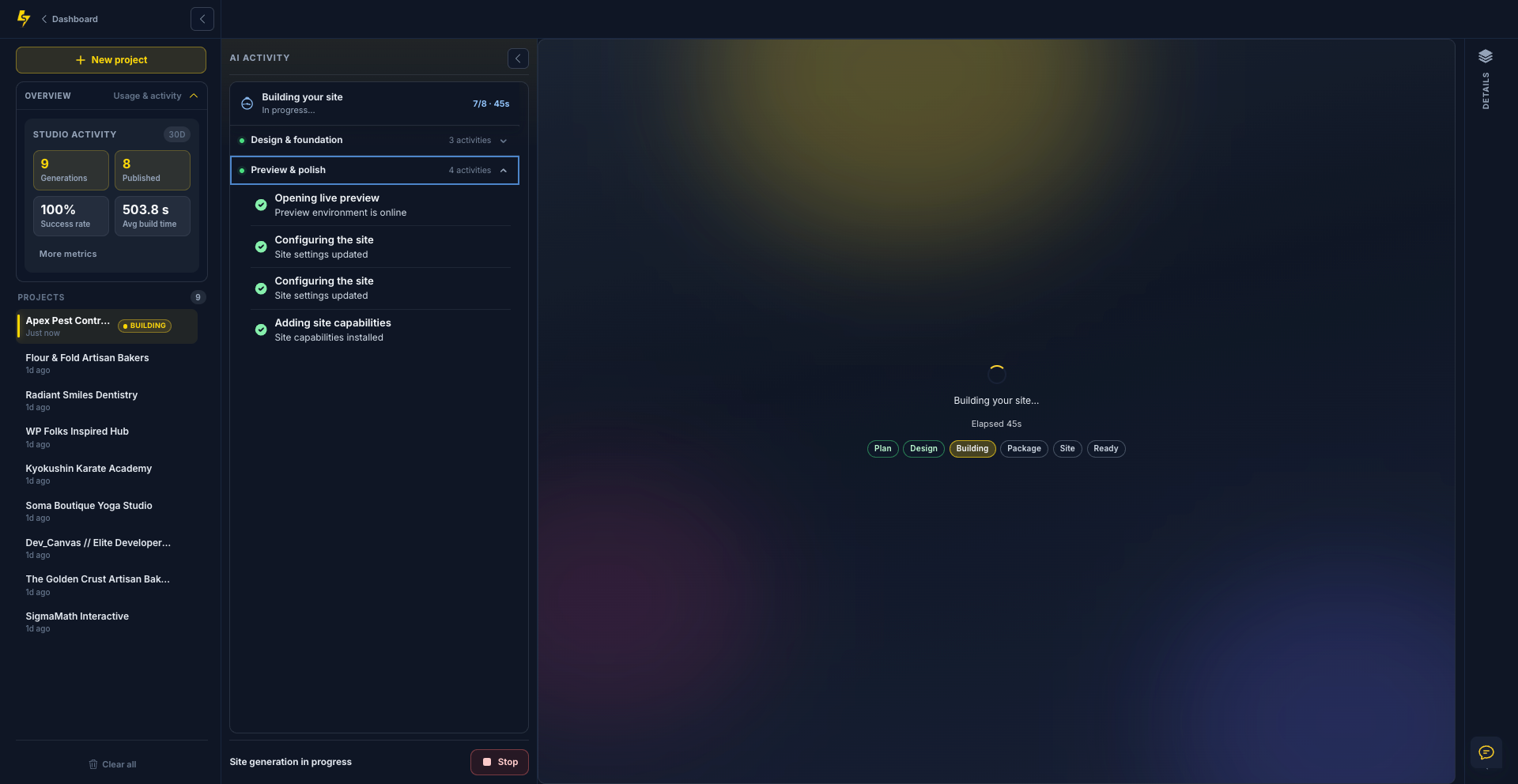
Follow the work in AI Activity as SiteSkite plans the experience, creates the design system, builds the theme, and checks the site.
Review the real site
Open the finished result in a browser-style preview. What you see is a working, WordPress-native site — not a static mockup.
Refine & go live
Click text or sections in Feedback mode and send changes to Chat. Tune site identity and the design system, then publish in one click or download a portable ZIP.
See SiteSkite AI Site Studio in action
InfluenceWP recorded a first-look walkthrough — from brief to a working WordPress preview in the Studio.
Video by InfluenceWP
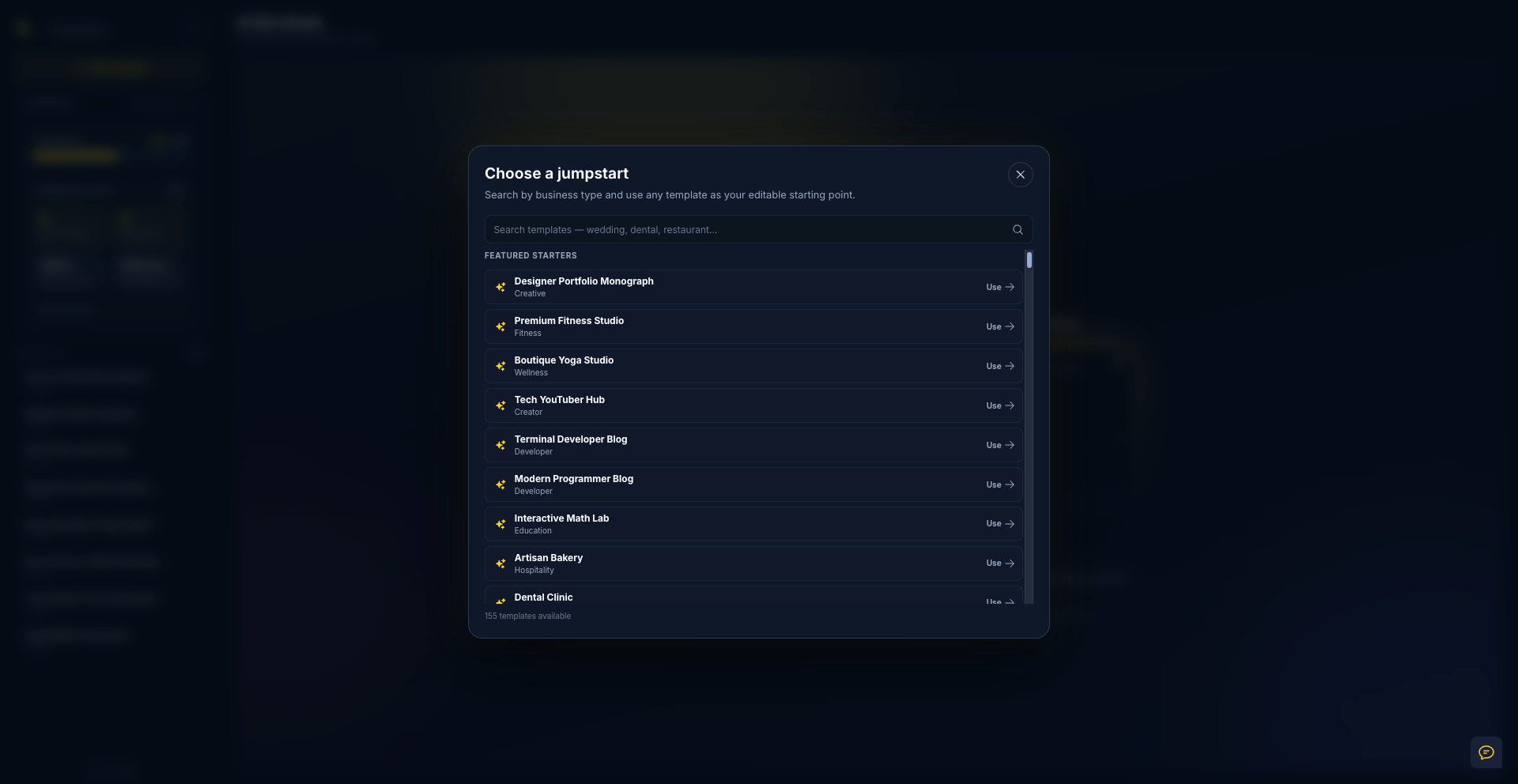
Start with a proven direction — not an empty prompt
Browse 155 searchable jumpstarts for businesses, portfolios, creators, developers, restaurants, studios, and more. Pick one as your editable starting point, then add your business details and creative direction.
From artisan bakery to dental clinic, each jumpstart helps you write a stronger brief without forcing your site into a fixed template.
See the work behind your website
AI Site Studio makes generation visible. Follow each completed and in-progress task from design foundations to theme files and final visual checks — you always know what is happening and when the preview is ready.
Desktop and mobile visual checks appear in the activity history, so completed projects keep a readable record of how they were built.
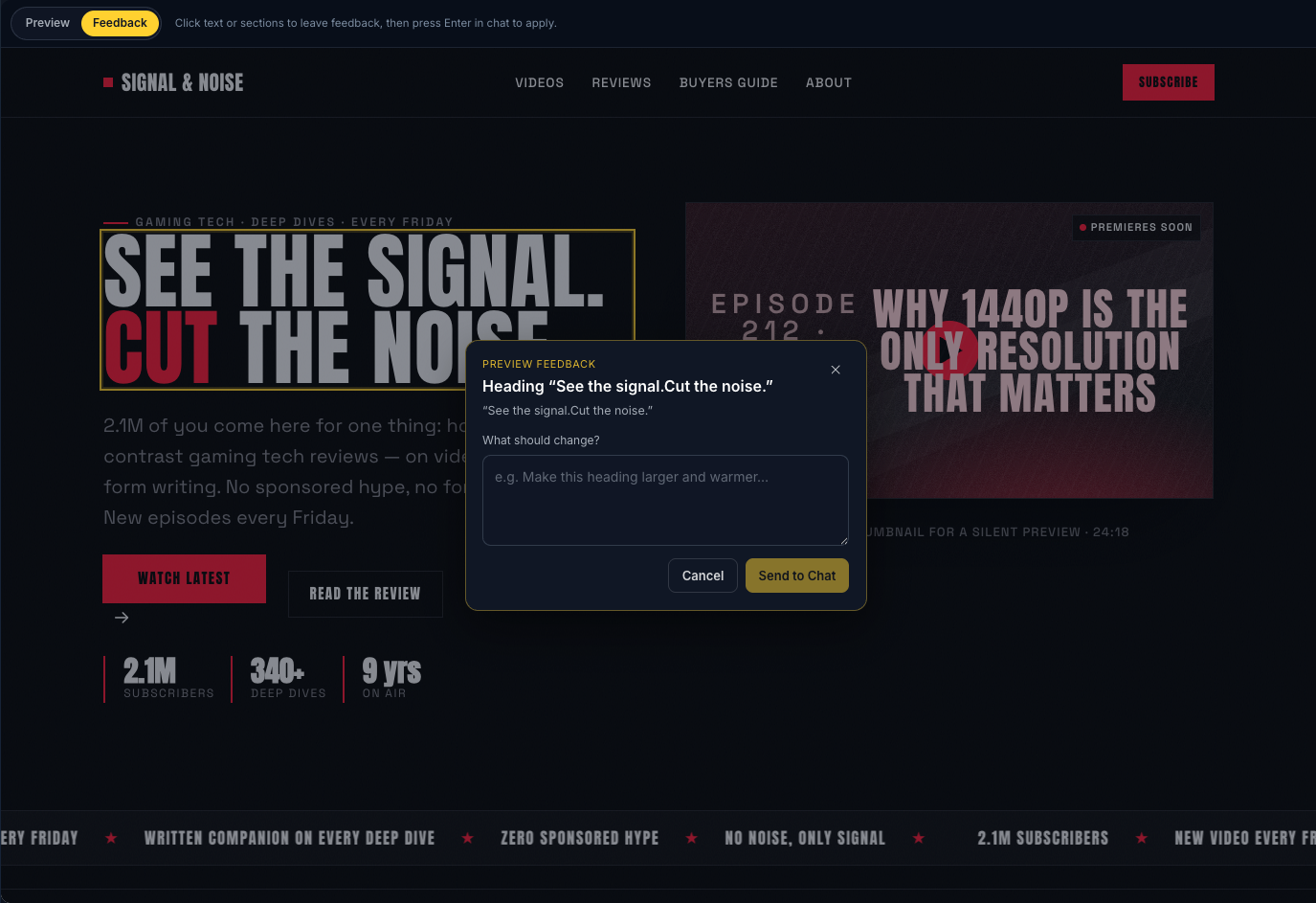
Click a section. Describe the change. Send to Chat.
Switch to Feedback mode in the preview, click any text or section, and tell the AI what should change — larger heading, warmer tone, new layout, anything in plain language.
SiteSkite carries the page context into Chat so you refine the site through conversation without leaving the creative flow or hunting through settings.
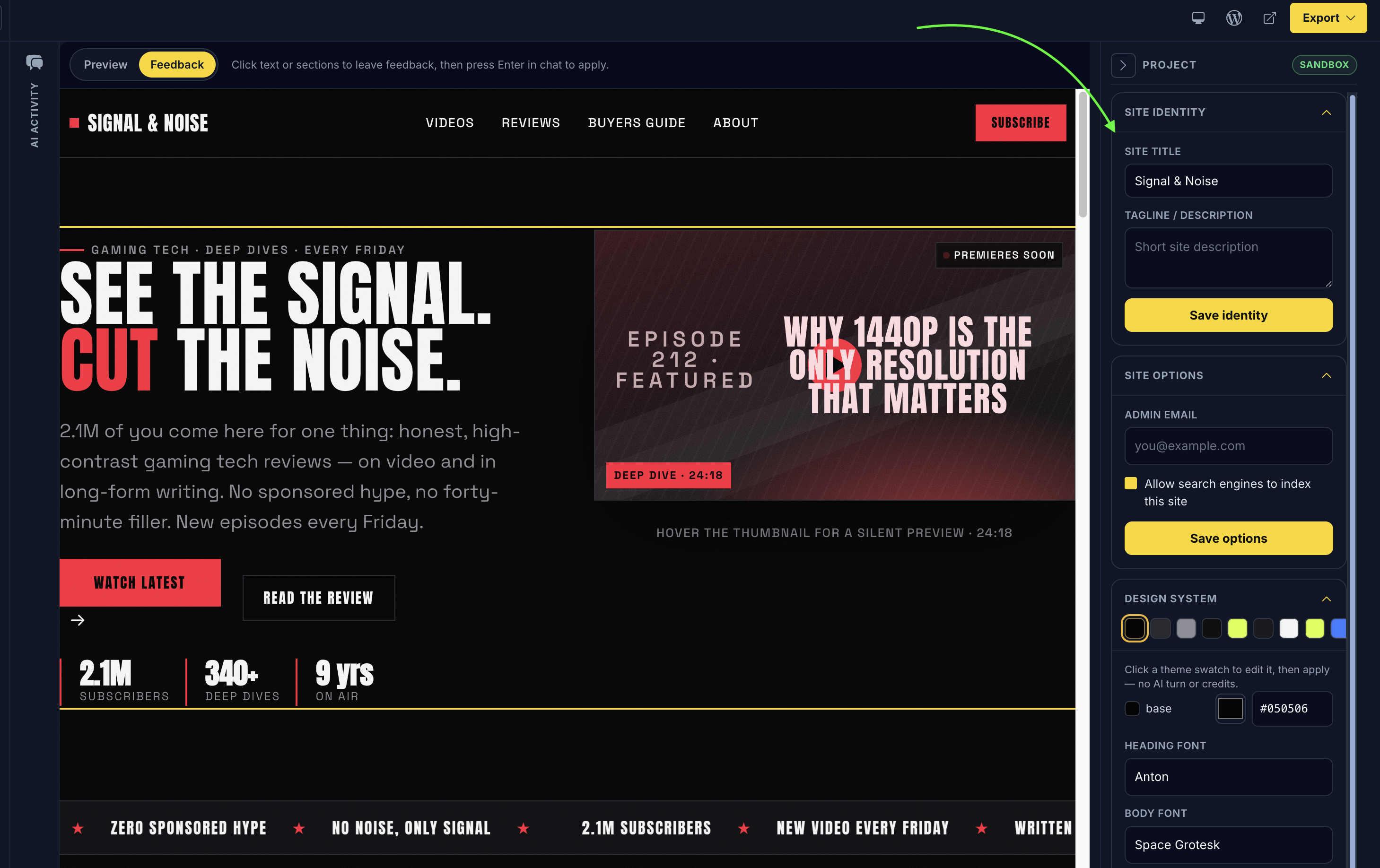
Set the title, email, colors, and fonts — without leaving Studio
Update site title, tagline, and admin email from the project panel. Search indexing and other site options stay in the same place.
Adjust the design system directly — color palette, base colors, heading font, and body font — so the site matches the brand before you publish or export.
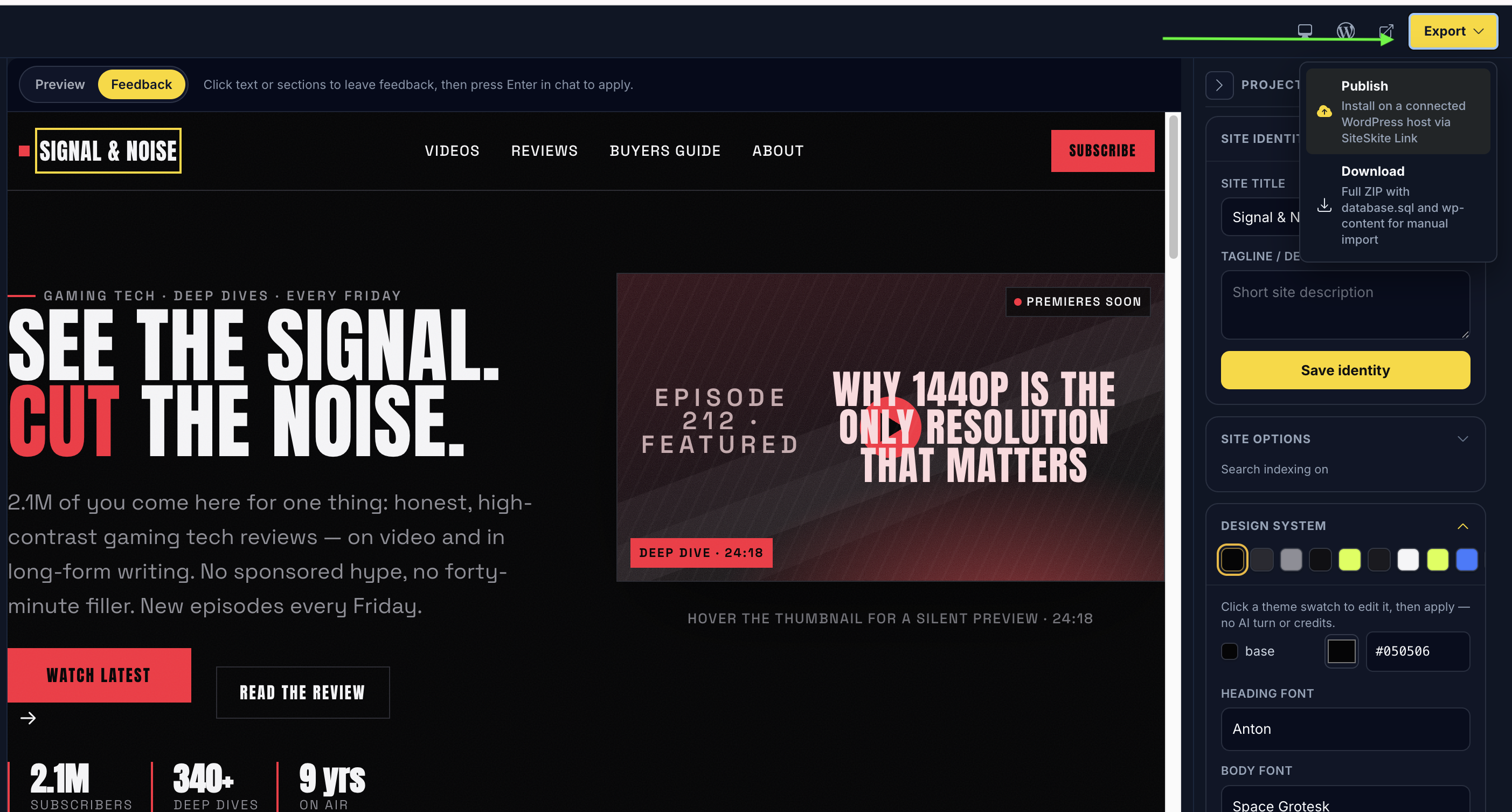
One click to your host — or download the full site as ZIP
Connect a WordPress site to SiteSkite, then use Export → Publish to install the rendered site on that host in one click through SiteSkite Link.
Prefer manual control? Download a full ZIP with database.sql and wp-content, then import it into any WordPress environment you choose.
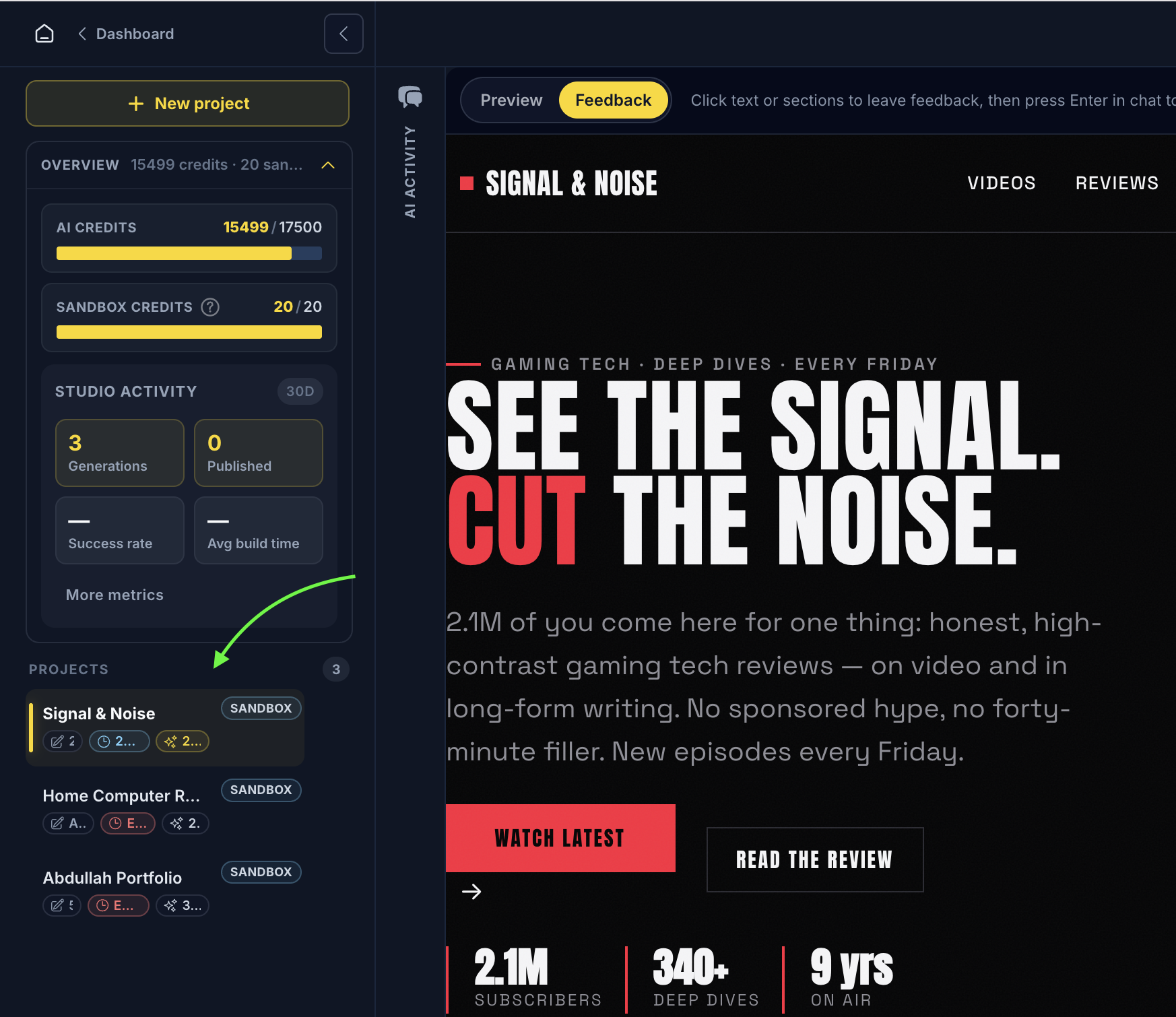
Every project gets its own AI sandbox site
AI Site Studio projects run on dedicated sandbox environments — isolated from live client sites while you generate, refine, and preview.
Each project is clearly marked in the Studio sidebar, so experiments stay separate from production WordPress properties in your portfolio.
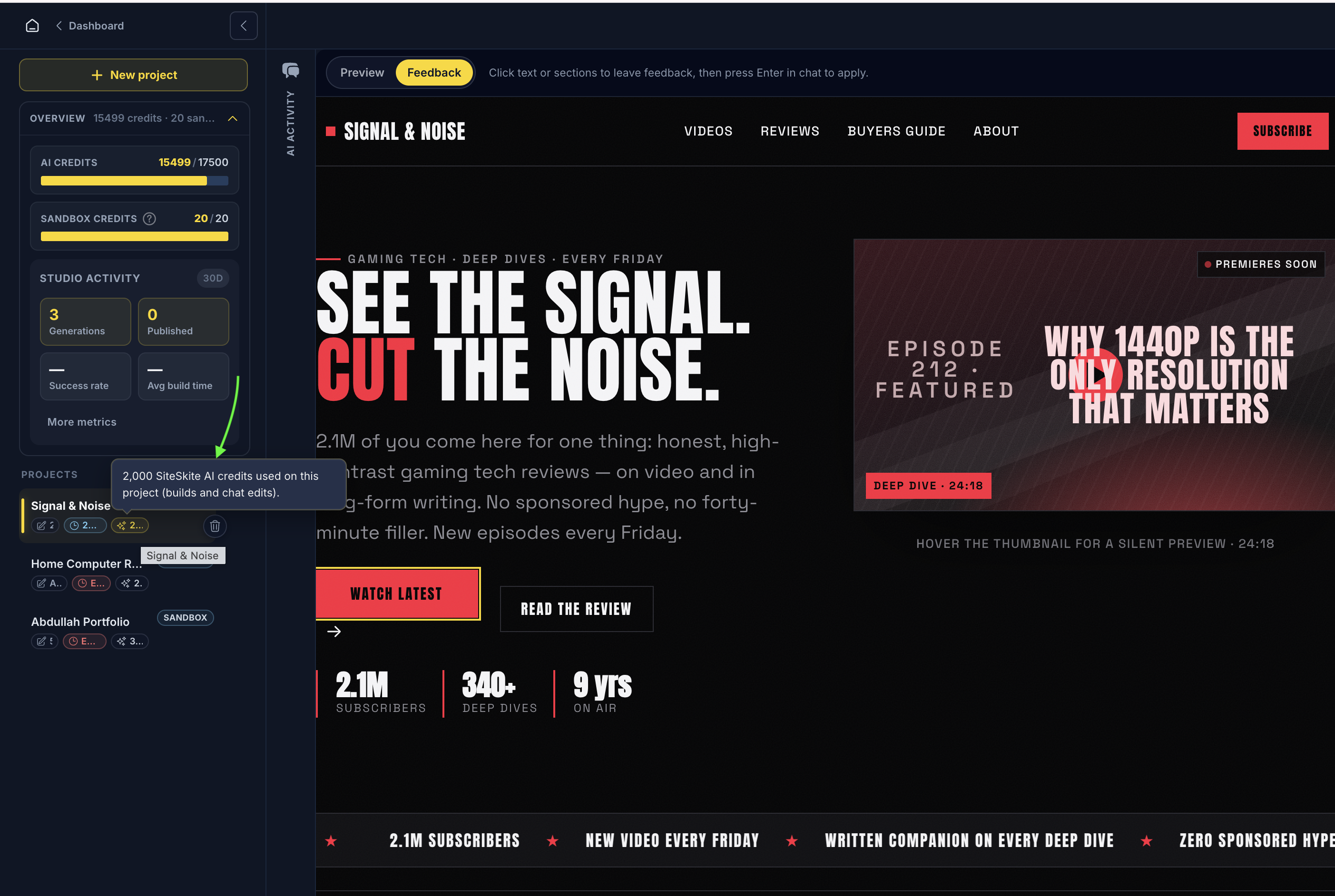
See exactly what each site cost to build
The project panel shows advanced billing detail — how many AI credits were used to create and refine each site, plus sandbox credit allowance and expiry.
Studio activity metrics — generations, published projects, success rate, and average build time — sit alongside your project list so usage stays transparent at scale.
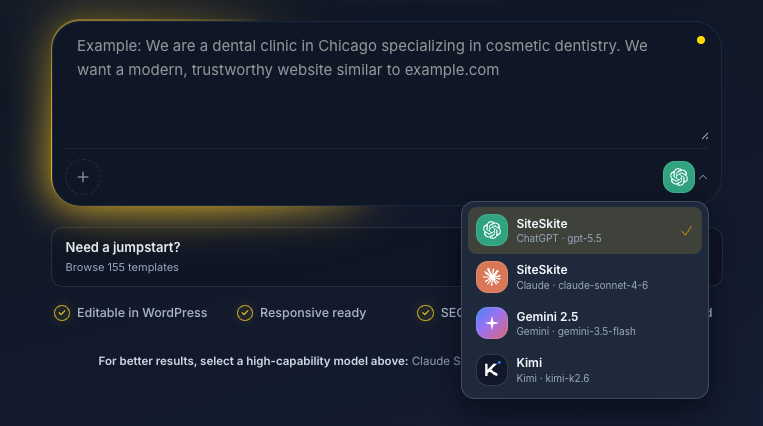
Use SiteSkite AI — or bring your own
Choose the model that fits the project. Start immediately with SiteSkite Powered AI, or connect your own provider for direct control over model access and AI billing.
Work with supported GPT, Claude, Gemini, and Kimi models from the same Studio experience. Model availability depends on the providers and credentials configured for your account.
Transparent at every stage
The AI Activity timeline groups the build into readable stages, so the process never feels like a black box.
Design & foundation
Site structure, visual direction, design system, and content planning.
Theme files
WordPress theme creation, layouts, components, media, and site configuration.
Preview & polish
Responsive checks, visual validation, site settings, capabilities, and the live preview.
The AI builder ends where WordPress begins
Many AI builders give you a hosted page, a static export, or a proprietary project only their platform understands. AI Site Studio creates a custom, WordPress-native starting point designed for the ecosystem you already use.
A real custom theme
The design is packaged as a WordPress theme instead of being trapped in a proprietary visual canvas.
Editable WordPress content
Continue working in WordPress with familiar content and site-editing workflows.
Responsive from the start
Layouts are designed and visually checked for desktop and mobile during the build.
Ready for the wider ecosystem
Keep using the WordPress tools, plugins, hosting, and operating workflows that fit your business.
Site identity & design system
Set site title, tagline, admin email, color palette, and fonts from the project panel — no separate design tool required.
Publish or export when ready
Publish to a connected WordPress site in one click through SiteSkite Link, or download database.sql and wp-content as a portable ZIP.
Dedicated AI sandbox per project
Each Studio project runs on its own isolated sandbox environment while you build and refine — separate from live client sites.
AI gets you past the blank page. WordPress keeps you in control of what comes next.
Skip the slowest part of starting a WordPress site
The distance between an idea and a site worth reviewing is where projects stall. AI Site Studio closes it.
Weeks of setup before anything worth showing
Empty installs, demo hunting, and page-builder stacks feel productive — until the calendar says otherwise.
- Start with an empty install or hunt through theme demos.
- Assemble a premium theme and page-builder stack.
- Rework placeholder content section by section.
- Wait until late in the project to see mobile problems.
- Pay ongoing licenses just to keep editing the delivered design.
- Treat production as the place where ideas get tested.
The first version costs the most time — and delivers the least of your actual vision.
One guided workflow from idea to reviewable site
AI Site Studio is not here to replace WordPress. It removes the repetitive setup between an idea and the first site worth reviewing.
- Start with one sentence or a relevant jumpstart.
- Let AI plan, design, build, and visually check the first version.
- Watch every major stage in a transparent activity timeline.
- Open a working WordPress preview instead of approving a mockup.
- Refine sections through Feedback mode and send changes to Chat.
- Tune site identity, colors, and fonts from the project panel.
- Publish to a connected WordPress site in one click or download a portable ZIP.
- Keep the result in the WordPress ecosystem.
- Move from idea to a reviewable site in one guided workflow.
Describe the business, choose the AI, and review the first WordPress version while it is still day one.
AI providers
Start immediately with managed AI, or connect your own provider — the Studio workflow is the same either way.
SiteSkite Powered
No provider setup or API key required. Use supported models through your SiteSkite credits and keep the entire workflow in one place.
Bring Your Own Model (BYO)
Connect a supported provider and use your own API credentials. Your provider handles model billing while SiteSkite handles the WordPress build workflow.
Start a WordPress build without leaving the conversation
SiteSkite's MCP connector brings AI Site Studio to the AI clients you already work in. Ask your assistant to create a site, inspect build status, refine a project, or list existing projects while SiteSkite runs the same WordPress-native workflow in the background.
 ChatGPT
 Claude
 Cursor
Available operations depend on the connected client and your SiteSkite account.
- Planning the experience
- Designing the theme
- Building WordPress
- Opening live preview
More first drafts. Less first-week setup.
Agencies, freelancers, business owners, and developers all get the same fast path from brief to a reviewable WordPress site.
Agencies
Turn a client brief into a reviewable WordPress direction before setup work consumes the project budget.
Freelancers
Move from discovery call to a working first version faster, then spend your time on the details clients actually notice.
Business owners
Explain the business in your own words and get a professional WordPress starting point without learning a design tool.
Developers
Skip repetitive scaffolding and begin with a generated theme, structured content, and a live site ready for technical refinement.
Hosting & maintenance teams
Give customers a faster path from a new WordPress environment to a site they can see, review, and continue managing.
From idea to live
WordPress website.
Describe your business in one sentence.
We’ll design, build and publish a real WordPress website you can edit instantly.
- ✓Editable in WordPress
- ✓Responsive ready
- ✓SEO optimized
- ✓No coding required
For best results, always use a high-capability model in the Studio: Claude 4.6+, Gemini 3+, Kimi 2.6+, or GPT 5.5+.
7-day free trial · No credit card required