
Stop proving you were busy. Prove the site grew.
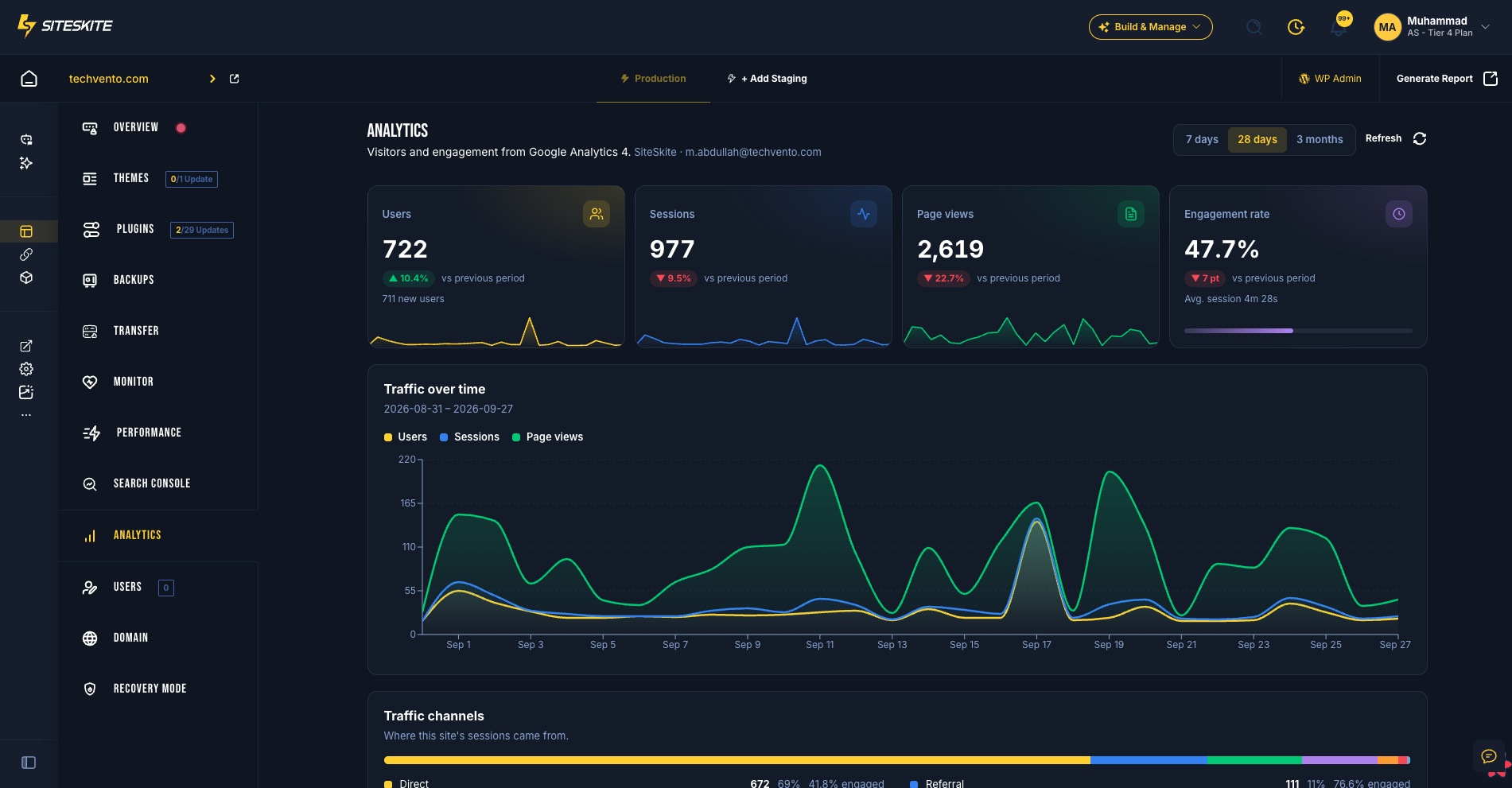
SiteSkite brings Google Analytics 4 into every linked WordPress site: users, sessions, page views, engagement, traffic channels, and top pages, right beside the updates, backups, and fixes that moved them. One login covers every client, and you never have to dig through GA4 menus.
7-day trial · No credit card · Included on every paid plan
What GA4's complexity quietly costs your agency
Clients don't cancel because a plugin was out of date. They cancel when they can't see what they're paying for.
Reports nobody reads
A page of plugin version numbers doesn't renew a retainer. Traffic and engagement shown next to your work does.
GA4 is a maze
Explorations, data streams, comparisons: most clients, and plenty of teams, give up before they find the one number they wanted.
Problems found weeks late
A traffic dip after an update, or a channel that suddenly dries up, goes unnoticed when nobody opens GA4 for every site.
Hours you can't bill
Separate logins per client, separate properties per site, separate screenshots per report. That's admin work, not agency work.
The client asks “is the website working?” Two ways to answer.
One answer takes an afternoon of GA4 digging. The other takes one click.
Without SiteSkite
- Log in to GA4, switch accounts, find the right property
- Build an exploration just to see channels and top pages
- Match traffic dates against your update log by hand
- Paste screenshots into a separate client report
With SiteSkite
- Open the site. Analytics is already a tab
- Users, sessions, page views, and engagement, each with a trend vs the previous period
- Traffic trends in the same portal as backups, updates, and performance
- The Analytics section in white-label reports fills itself every period
Everything in the Analytics tab
The GA4 numbers clients care about, without explorations, filters, or training.
Four KPIs with trends
Users (with new users), sessions, page views, and engagement rate (with average session duration), each showing the change vs the previous period.
Traffic over time
Users, sessions, and page views day by day across 7 days, 28 days, or 3 months, with key events counted when your property tracks them.
Traffic channels
Direct, organic search, referral, social, and more, with each channel's share of sessions and its own engagement rate.
Top pages
The most-viewed pages, with users and average session time, so you know which content is doing the work.
Sources, countries, and devices
Source and medium breakdowns, top countries, and the device split, all sortable in place.
Set once, linked automatically
Pick the GA4 property once per site. If a Search Console property matches the same domain, SiteSkite links it for you.
Know which channel is carrying the site, and which one just stopped
When a client says “we're getting fewer leads”, the answer is usually in the channel mix. SiteSkite shows it in one bar, so the conversation moves from blame to next steps.
- Share of sessions for every GA4 default channel group
- Engagement rate per channel, so you see quality as well as volume
- Compare 7-day, 28-day, and 3-month windows in one click
- Drill into source and medium when a channel changes
Connected in four steps
SiteSkite reads your existing GA4 property. It doesn't add tracking code, change your tags, or ask you to create credentials.
Open a linked site
Go to any linked WordPress site in SiteSkite and select the Analytics tab.
Sign in with Google
Approve read-only access. One connection covers Google Analytics and Search Console.
Pick the GA4 property
Choose the property for the site. A matching Search Console property is linked automatically.
Put it in your reports
Add the Analytics section to a report profile. Sites without Google Analytics are skipped automatically.
What this looks like when a client pushes back
The situation
A client emails: “The website isn't bringing in leads anymore. What are we paying for?” Normally that means an afternoon in GA4, a pile of screenshots, and a defensive reply.
With SiteSkite
Instead, the account manager opens the site in SiteSkite. Sessions are up, organic search is steady, and one referral partner stopped sending traffic two weeks ago. The reply goes out in ten minutes with a fix, and the conversation turns from “what are we paying for?” to “what should we do next?”
- Answers backed by the client's own GA4 data
- Traffic context beside the maintenance log
- Faster replies and calmer renewals
Google Analytics in WordPress management tools, compared
GA4 alone tells you traffic moved. Search Console tells you why. Here's who gives you both in one place.
| Platform | Search Console | Google Analytics 4 | In client reports | Setup |
|---|---|---|---|---|
| SiteSkite | Included: Built in on every linked site | Included: Built in on every linked site | Included: Both, in white-label reports | Included: Sign in with Google, no Cloud project |
| ManageWP | Not available: No native integration | Included: Included | Paid add-on or extension: GA only, via Client Report add-on | Included: Sign in with Google |
| MainWP | Paid add-on or extension: Pro extension | Paid add-on or extension: Pro extension | Paid add-on or extension: Via Pro extensions | Limited: Your own Google API project or JSON key |
| Modular DS | Included: Included | Included: Included | Included: Both, in reports | Included: Sign in with Google |
| WP Umbrella | Not available: Not available (open feature request) | Included: Included | Limited: GA4 only | Included: Sign in with Google |
| WP Remote | Not available: No native integration | Included: Included | Limited: GA4 only | Included: Sign in with Google |
| WPMU DEV | Limited: Beehive plugin, inside each wp-admin | Limited: Beehive plugin per site; the Hub uses its own tracker | Limited: Built-in WPMU DEV analytics, not GA4 | Limited: Plugin configured on each site |
| InfiniteWP | Paid add-on or extension: Paid add-on, crawl errors only | Paid add-on or extension: Paid add-on | Paid add-on or extension: GA via Client Reporting add-on | Limited: Your own Google Cloud OAuth credentials |
| InstaWP | Not available: Not available | Not available: Not available | Not available: No Google data in reports | Not available: Install Site Kit on each site |
Based on each vendor's public documentation and pricing pages, reviewed September 2026. Products change — check the vendor's site for current details.
Where the alternatives fall short
Having “Google Analytics” on a feature list isn't enough. Here's what's missing once you actually use it.
Traffic without the search story
ManageWP, WP Umbrella, and WP Remote show GA4 but not Search Console. You see that traffic moved, but not which queries or rankings moved it.
Their tracker, not your GA4
WPMU DEV's Hub reports use its own built-in analytics. Seeing GA4 means installing the Beehive plugin inside each site.
Credentials homework first
MainWP and InfiniteWP require your own Google API project or OAuth credentials, sold as paid extensions or add-ons.
Nothing at all
InstaWP's client reports cover uptime, performance, and security scans. There's no Google Analytics data to show the client.
Search data is one layer. The rest of the operation comes with it.
Tools that stop at reporting leave you paying for staging, backups, and AI elsewhere. In SiteSkite, the Google data sits beside the work that moves it.

Google Search Console
Clicks, impressions, CTR, position, and SEO quick wins for every linked site, from the same Google sign-in.
Learn more
White-label Reports
Search and traffic sections sit beside updates, backups, and uptime in one branded report your clients actually read.
Learn more
Page Speed Performance
Core Web Vitals next to your search and traffic data, so a slow LCP never hides behind a ranking drop.
Learn more
Sandbox Sites
Test the title rewrite, the new section, or the plugin change on a sandbox before it touches a ranking page.
Learn more
AI Site Studio
Go from a brief to an editable WordPress theme on its own sandbox. None of the dashboards above include it.
Learn more
MCP Support
Run backups, sandboxes, and safer updates from Claude, ChatGPT, or Cursor through SiteSkite MCP.
Learn moreRead-only. Encrypted. Revocable.
Analytics data belongs to your client. SiteSkite only reads it to show it back to you.
How SiteSkite handles Google data
SiteSkite asks for the minimum access needed to show your data, and nothing more.
- Read-only Analytics access, so SiteSkite can't edit properties, streams, users, or settings
- OAuth tokens encrypted at rest. Your Google password never touches SiteSkite
- Used only for your dashboards and reports. Never sold, never used for ads, never used to train AI models
- Disconnect the Google account and SiteSkite revokes access with Google and deletes the connection
Built for
- Agencies whose renewals depend on showing results
- Freelancers who want reports that look like a bigger team made them
- Marketing teams running several WordPress properties
- Site owners who want the traffic numbers without learning GA4
Show clients the growth, not just the maintenance.
Google Analytics 4 is included on every paid SiteSkite plan, alongside Search Console, white-label reports, backups, monitoring, sandbox staging, and AI tools. Start a trial and connect your first site in minutes.
7-day trial · No credit card required · Not included on the Free plan