Run bulk updates
Open the dashboard, filter sites with pending updates, and run bulk plugin updates.
ManageWP flowSolutions by role
Use cases
Migration & recovery
Industries
Automation & AI
Control & ops
Reliability
Infrastructure
Launches, upgrades, and newsletter-style stories about what we shipped on the platform.
Read the news


SiteSkite vs ManageWP
ManageWP is a solid maintenance dashboard for updates and backups across a handful of sites. SiteSkite starts there, then evolves into a full WebOps layer for agencies managing WordPress at scale.
Try SiteSkite free7-day trial · No credit card · Run alongside ManageWP while you evaluate
Shift from repetitive maintenance to scalable operations.
Updates, backups, staging, monitoring, reporting, and AI — all in one place.
Add clients, sites, and teammates without adding chaos.
The operational gap
Solid for connecting sites and running updates — especially when the portfolio is small and needs stay simple.
Built for agencies that outgrow add-on stacks — environments, automation, recovery, and team workflows in one place.
Most teams start with ManageWP because the free tier covers basics: connect sites, run updates, schedule a backup. That works until your portfolio grows — then add-ons, production testing, and tool-hopping take over.
What it actually feels like when you push plugin updates across 25 client sites.
Open the dashboard, filter sites with pending updates, and run bulk plugin updates.
ManageWP flowOpen one dashboard — uptime, SSL, and incidents are visible before you touch anything.
SiteSkite flowTurn on Safe Updates, Backup, and Uptime add-ons separately for sites that need them.
Premium add-onsSpin a sandbox or staging link to validate the update batch without touching production.
Built-in stagingWithout Safe Updates enabled, plugin batches go straight to live client sites.
No sandboxPush updates with rollback ready; WP Essentials reapplies your standard plugin stack.
Included rollbackLog into each site to confirm nothing broke — or wait for client emails.
Per-site loginBackups run on schedule — optionally in the client's own S3, Drive, or Dropbox.
BYO storageExport or enable another add-on when it is time to prove maintenance value.
Extra setupPush a white-label report from the same workspace your team and clients already use.
Included reportsNot checkmarks on a spec sheet — capabilities that change how agencies deliver work.

See Google Search clicks, impressions, rankings, and SEO quick wins next to GA4 on every linked site. ManageWP shows Google Analytics but has no native Search Console integration.
Learn More
Turn a brief into a real WordPress FSE theme — generate multiple concepts, refine with AI chat, and deploy to Sandbox. ManageWP has no equivalent prompt-to-theme workflow.
Learn More
Launch isolated WordPress environments in seconds. Test plugin batches and theme changes before they hit a client domain — with production and staging links built in.
Learn More
Backup and restore to your client's S3, Google Drive, or Dropbox. Keep data where your clients expect it — not locked in a single vendor bucket.
Learn More
Deploy your agency's standard plugin stack to one site or fifty with a single action. Standardize client projects without repetitive manual installs.
Learn More
Save fully configured site setups and launch repeatable environments from templates — for new builds, demos, QA, and rapid project delivery.
Learn More
Operate sites without SSH — debug settings, maintenance mode, error logs, and more from one dashboard. Connect AI agents via SiteSkite MCP when you are ready.
Learn More
Invite admins, team members, and customers with scoped permissions. Everyone gets the access they need — without sharing dashboard credentials.
Learn More
Smart, safe, and automated

Reliable backups you can trust
Test changes without risk

Uptime, performance, and real-time alerts
Prompt-to-WordPress — competitors don't offer this

White-label reports that impress
What ManageWP covers with premium add-ons — and the WebOps capabilities SiteSkite includes beyond maintenance dashboards.
| Capability | ManageWP | SiteSkite |
|---|---|---|
| Bulk plugin & theme updates | Included (free tier) | Included — bulk updates with rollback |
| Scheduled backups | Premium add-on (+$2/site) | Included — daily, weekly, or on-demand |
| Uptime monitoring | Premium add-on (+$1/site) | Included — 2-min intervals on Advanced |
| White-label client experience | Premium add-on (+$1/site) | Included — white-label plugin |
| Client reports | Premium add-on (+$1/site) | Included — maintenance, performance, Search Console & GA4 |
| Vulnerability scanning | Premium add-on (+$2/site) — single-source checks | Included — malware scanning (no virtual patching) |
| Portfolio security score | Not available | Included — per-site security score in BirdEye |
| PHP error & fatal error monitoring | Not available | Included — advanced PHP error tracking & alerts |
| SSL certificate expiry monitoring | Limited — via uptime add-on only | Included — SSL status & expiry in BirdEye |
| Domain expiry monitoring | Not available | Included — domain expiry alerts in BirdEye |
| GDPR-compliant backup storage | Vendor-managed storage only | Included — BYO cloud (S3, Drive, Dropbox) on your terms |
| Backup migration to another host | Not available | Included — migrate or clone between servers from backup |
| Create sandbox from existing backup | Not available | Included — full clone for testing before production |
| Safe mode / recovery access | Not available | Included — regain wp-admin without FTP or hosting access |
| Sandbox / staging environments | Not available | Included — sandbox & staging links |
| Bring-your-own backup storage | Not available | Included — S3, Drive, Dropbox |
| Plugin preset bundles | Not available | Included — WP Essentials |
| Site blueprints & templates | Not available | Included — Blueprints & marketplace |
| Team & client role access | Limited client management | Included — workspaces & invites |
| Google Search Console dashboard | Not available — no native Search Console integration | Included — clicks, CTR, position & SEO quick wins per site |
| Google Analytics 4 dashboard | Included — GA4 widget | Included — users, sessions, channels & top pages per site |
| Search & traffic data in client reports | GA only — via Client Report add-on (+$1/site) | Included — Search Console & Analytics report sections |
| AI Site Studio (prompt-to-WordPress themes) | Not available | Included — FSE themes from prompts, AI refinement, Sandbox deploy |
| AI / MCP integration | Not available | Included — MCP & BYO LLM |
ManageWP's free core is real — but agencies typically need backups, monitoring, security, and reporting on every client site. Here is the math.
ManageWP add-on prices vary; totals below use commonly quoted $1–$2 add-on rates. ManageWP also offers a $150/mo bundle for up to 100 sites (~$1.50/site) when you commit to their full premium stack.
~$0 free tier, or ~$8–12/mo with typical premium add-ons
$0 free tier with 1 GB backup — or $2.99/mo Advanced for full coverage
Link 3–5 representative client sites. Keep ManageWP running on the rest — SiteSkite's plugin does not conflict.
Use the 7-day trial to test sandbox updates, backups, monitoring, and a client report on actual sites.
Move sites in batches when you are confident. Reach out via contact if you want help planning the transition.
The interface gap
ManageWP was built to list sites and run tasks. SiteSkite was designed so operators see the whole portfolio — status, risk, environments, and next actions — without opening twelve tabs.
This is not a prettier skin on the same workflow. It is a different way to run WordPress at scale: fewer clicks to confidence, fewer surprises after deploy.
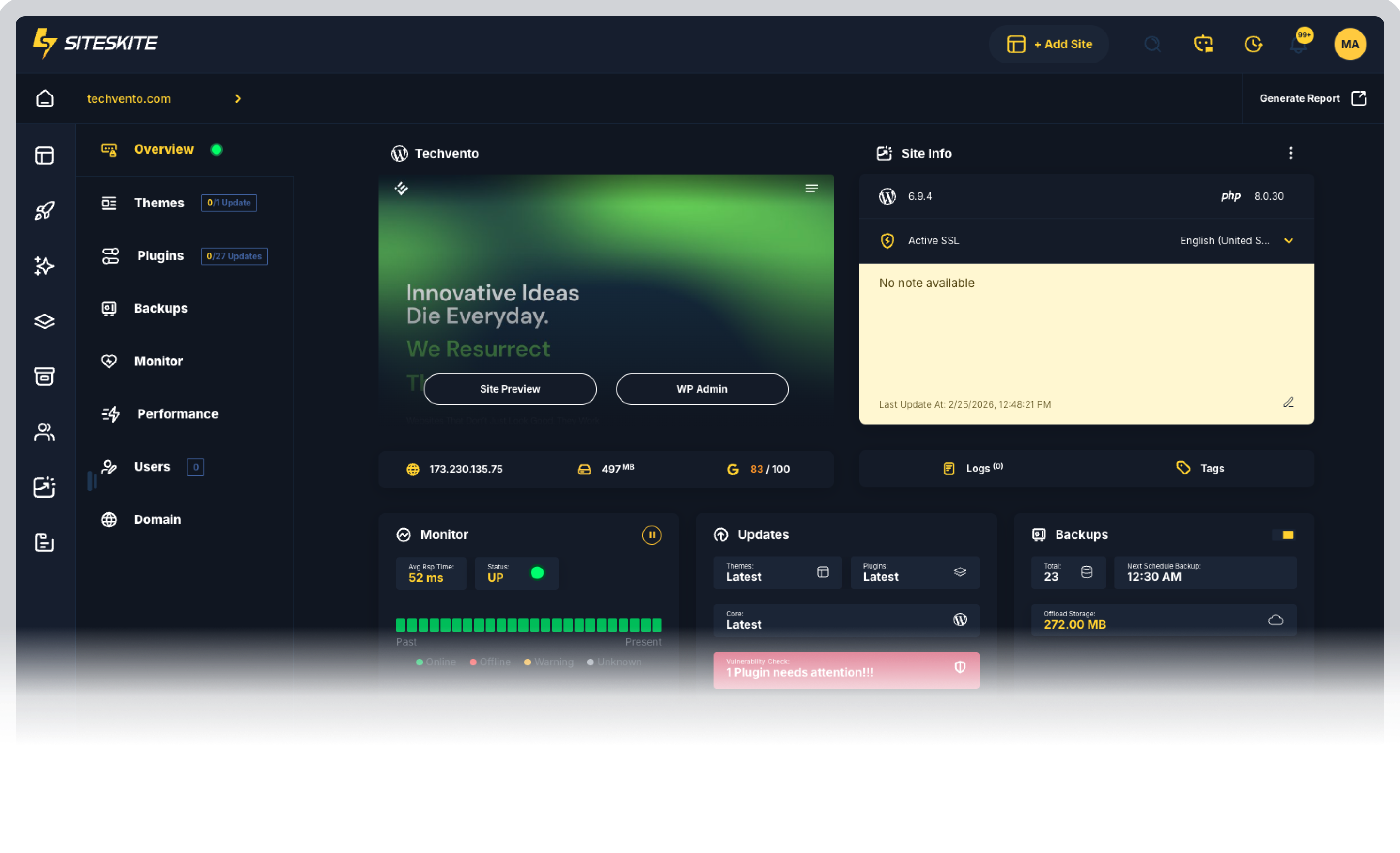
7-day trial · Connect a pilot batch in minutes
Your websites stay protected with automated updates, backups, and real-time monitoring.
One dashboard to handle all your WordPress sites—saving hours every week.
From single users to agencies, SiteSkite grows with your business needs.
Manage your WordPress sites smarter. Start your 7-day free trial and experience automated monitoring, backups, and full site control with SiteSkite.