
Standard plugin stacks, applied in one click
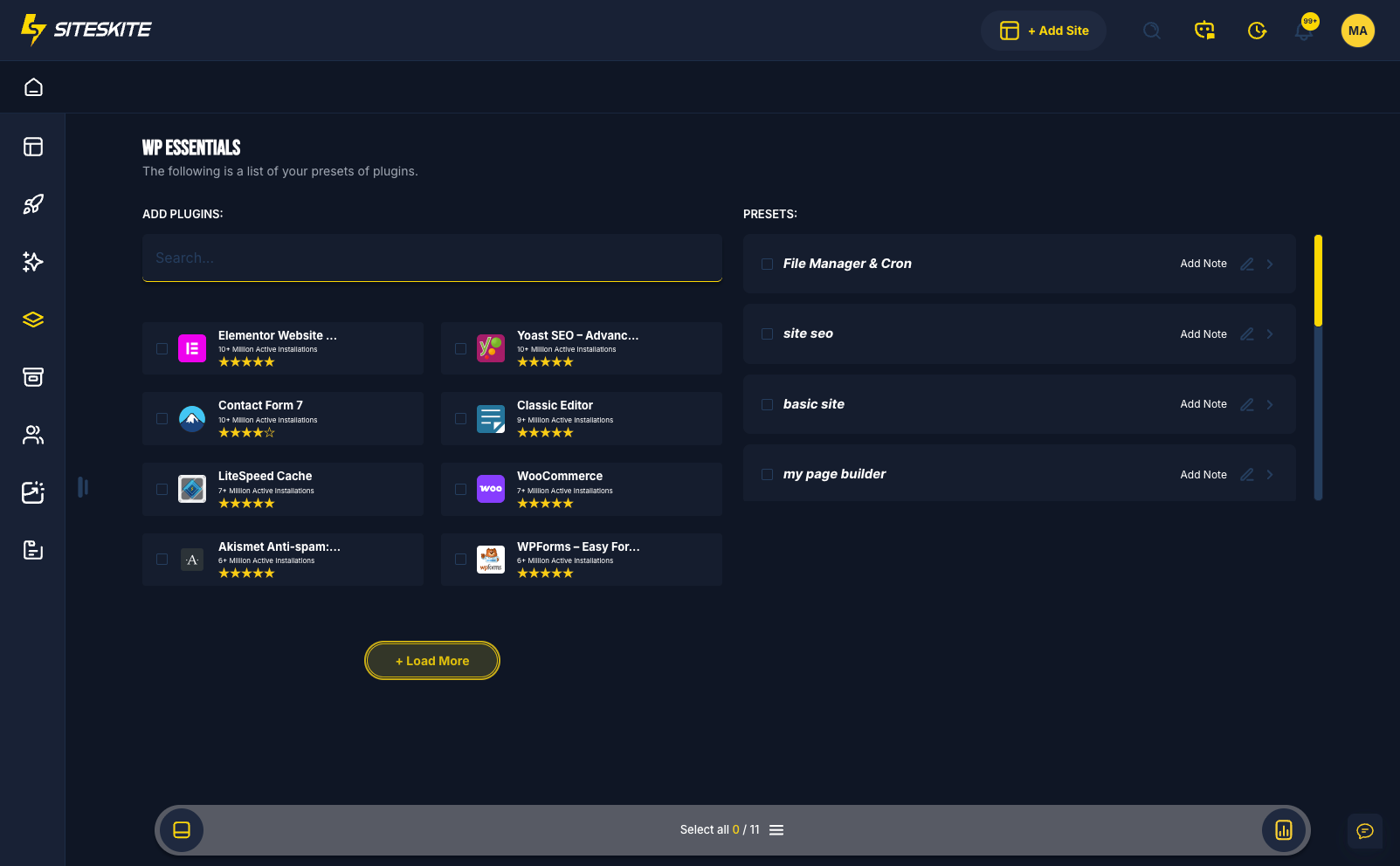
WP Essentials is SiteSkite's preset management system — bulk install, activate, or deactivate curated plugin lists on linked WordPress sites. Select a preset, apply it, and turn a 30–45 minute setup into seconds.
7-day trial · No credit card required
Why WP Essentials?
Agencies onboarding client sites, developers spinning up environments, and teams standardizing stacks should not repeat install → activate → configure for every project.
Hours to seconds
Replace repetitive plugin hunting and manual installation with one preset apply — SiteSkite handles install and activation for you.
Same stack everywhere
Use identical plugin environments across staging, dev, test, and production — and across every site in your portfolio.
Agency standards built in
Encode your internal toolkit once. New staff, contractors, and client handoffs start from the same baseline every time.
What WP Essentials does
Build reusable plugin presets and deploy them from WP Essentials or directly inside the linked site plugin installer.
Create custom presets
Add plugins by slug, from the WordPress repository, or from already installed plugins. Define install, activate, and deactivate-conflicting behavior.
Apply across linked sites
Open any linked site → WP Essentials, choose your preset, and click Apply Preset to copy your ideal environment instantly.
Plugin installer integration
Presets appear in Linked Site → Plugins → Add Plugins under the Plugin(s) Preset dropdown — review, optionally activate on install, and deploy the full stack.
Bulk site operations
Reuse the same preset across dozens or hundreds of sites without searching plugins individually on each dashboard.
Example preset stacks
Common agency presets you can build once and deploy everywhere.
SEO setup
Yoast SEO, redirection tools, and XML sitemap plugins — ready for content sites from day one.
Security stack
Login protection, firewall, and activity monitoring — a baseline hardening layer for client sites.
Developer toolkit
ACF, debugging utilities, and migration plugins — consistent dev environments across projects.
Client essentials
Contact forms, SMTP mail, and page builder — client-ready stacks without manual assembly.
Benefits for your workflow
WP Essentials removes the most repetitive part of WordPress setup — without overwriting existing site configurations.
Massive time saver
Fresh WordPress sites get essential plugins in seconds, not half an hour of admin work.
Consistency across sites
Standardized setups for agencies managing large portfolios or recurring client types.
Fewer human errors
No accidental plugin omissions, wrong versions, or forgotten security tools on new builds.
Client-friendly setup
Clients receive a fully optimized plugin environment from the first login.
Bulk-ready operations
Apply presets across multiple linked sites with the same workflow you use for one site.
How to use WP Essentials
Create once, reuse everywhere — from preset builder to linked site install.
Open WP Essentials
In SiteSkite, open WP Essentials and click Create New Preset to start your stack.
Build your preset
Add plugins by slug or repository, set install/activate behavior, and save — it appears in your Essentials list immediately.
Choose a linked site
Open the site → WP Essentials or Plugins → Add Plugins and select your preset from the dropdown.
Review & install
Review included plugins, optionally enable Activate after install, then click Install.
Deploy at scale
SiteSkite installs missing plugins, activates when enabled, skips duplicates — repeat across your portfolio.
Safe, reusable, portfolio-ready
Presets install plugins — they do not overwrite existing site configurations. Already-installed plugins are never duplicated.
Important to know
WP Essentials is designed for setup speed and consistency — not destructive overwrites.
- Presets must be created in WP Essentials before they appear in the installer
- Existing plugins on the site are not duplicated
- Site configurations beyond plugin install/activate are untouched
- Works with Smart Engine for reliable bulk plugin operations
Ideal when you
- Onboard new client WordPress sites on a regular cadence
- Need the same SEO, security, or dev stack on every build
- Want to standardize workflows for team members or contractors
- Manage many sites and hate repeating plugin setup manually
WP Essentials is included in your SiteSkite plan
Build your agency plugin stacks once and deploy them across linked sites — on the same WebOps layer as backups, staging, and Smart Engine automation.
7-day trial · No credit card required