
Stay ahead of risks with Vulnerability Detection
SiteSkite automatically scans WordPress core, themes, and plugins against trusted vulnerability databases — no configuration, no API keys, no extra security plugins. Real-time safety insights appear in updates, WP Canvas, and Smart Engine before harmful versions spread across your portfolio.
7-day trial · No credit card required
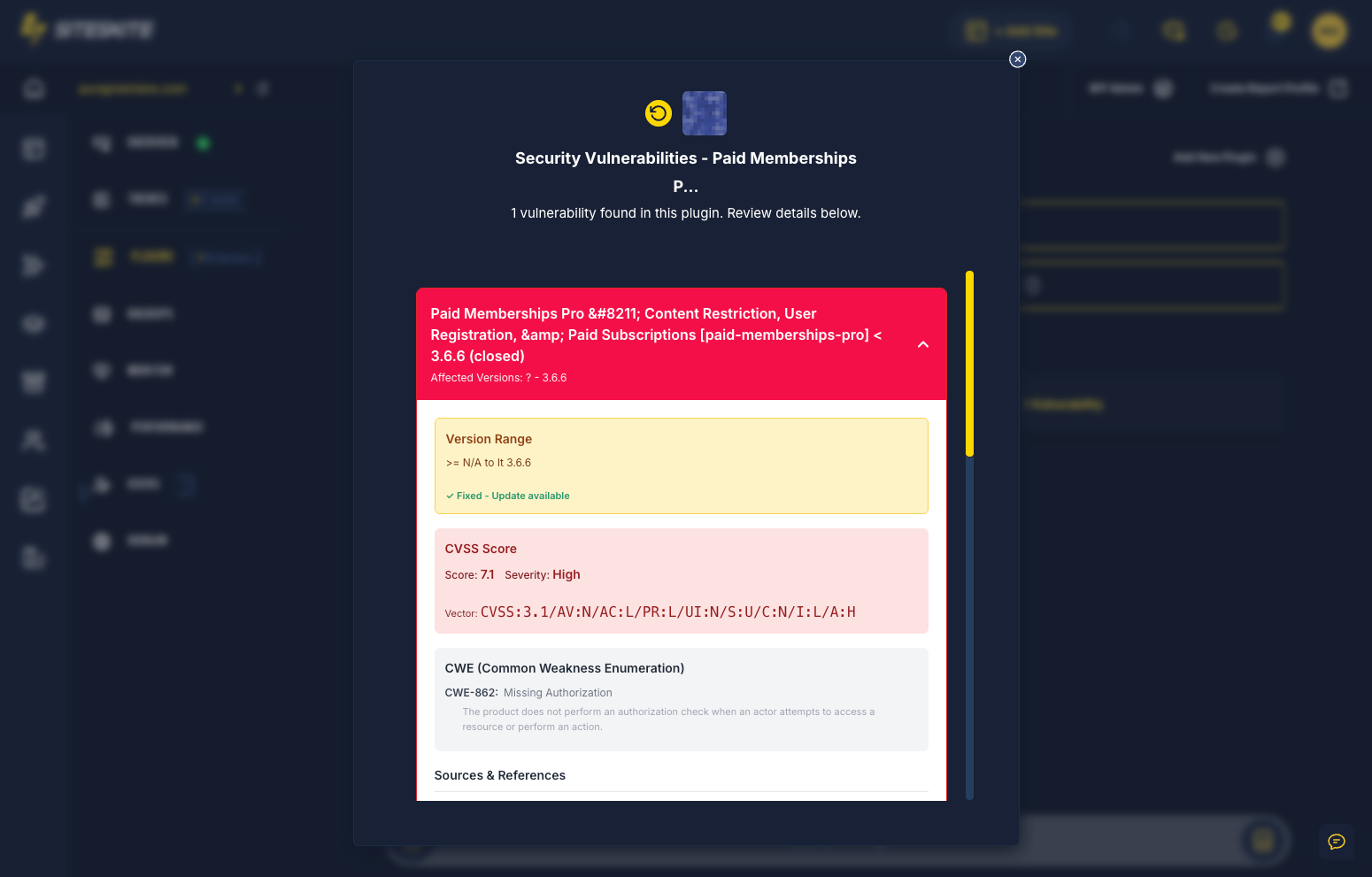
Why vulnerability detection matters
Outdated or vulnerable components are one of the fastest paths to a compromised WordPress site — especially across dozens of client installs.
Improved security posture
Instant awareness of harmful plugin, theme, and core versions reduces breach risk before attackers exploit known CVEs.
Safer updates
Smart Engine uses vulnerability data before running bulk updates — allow, defer, block, or recommend manual review.
Agency-friendly risk management
Scan dozens or hundreds of linked sites for known issues from one SiteSkite dashboard — no per-site security plugin stack.
No extra plugins required
Detection is built into the SiteSkite plugin and portal. Connect your site and monitoring begins immediately.
What SiteSkite monitors
Each time SiteSkite interacts with your website, it retrieves version data and checks for known security risks across core, themes, and plugins.
WordPress core
Detect known vulnerabilities in the WordPress version running on each linked site.
Installed themes
Flag themes with published security issues — including inactive themes still present on the server.
Installed plugins
Identify plugins with critical or high-severity vulnerabilities and surface remediation guidance.
Trusted data sources
Powered by Wordfence Threat Intelligence, Patchstack, WPScan, CVE & NVD feeds, vendor disclosures, and additional curated sources integrated by SiteSkite.
Zero setup — works automatically
There is no configuration, no keys, and no settings to enable. Vulnerability detection is fully automatic for every linked site.
- Runs continuously in the background after you connect a site
- Built into the SiteSkite plugin — no separate security tool to install
- Integrated with Smart Engine bulk update decisions
- Surfaces risks on plugin and theme update screens before you commit
- Highlights issues in WP Canvas Updates widget
- Updated continuously as new vulnerability data is published
- Works during updates, maintenance, monitoring, and everyday site management
Where vulnerabilities appear
SiteSkite highlights security risks directly inside the workflows you already use — not buried in a separate dashboard.
WP Canvas → Updates widget
See vulnerability status alongside pending core, plugin, and theme updates from the per-site WP Canvas view.
Plugin & theme update screens
Before updating, SiteSkite shows whether the installed version contains vulnerabilities and whether an available update fixes them.
Smart Engine bulk operations
Smart Engine uses vulnerability data to allow, defer, block unsafe updates, or recommend manual review across many sites.
Reports & activity logs
Track vulnerabilities found, plugins affected, and remediation actions — with reporting support for client-facing maintenance summaries.
Examples of detection
The kinds of alerts and guidance SiteSkite surfaces during everyday WebOps work.
- Critical vulnerability detected in Plugin X — Update Recommended
- Theme Y contains 2 known vulnerabilities
- Smart Engine skipped update due to incompatible vulnerable version
- This plugin update resolves 1 vulnerability (CVE-2024-XXXX)
How vulnerability detection works
Nothing to enable — just connect your website and use SiteSkite as normal.
Connect your site
Link your WordPress site to SiteSkite — detection begins immediately with no extra setup.
Background scanning
SiteSkite checks core, theme, and plugin versions against trusted vulnerability databases on each interaction.
Risks surfaced in context
Alerts appear in WP Canvas, update screens, Smart Engine, and reports — right where you take action.
Update or defer safely
Apply fixes, roll back if needed, or let Smart Engine block unsafe bulk updates until you review manually.
Use it as part of your security workflow
Vulnerability detection is proactive intelligence — pair it with backups, Safe Mode, and rollback for complete incident readiness.
Best practices
Treat vulnerability alerts as early warning — not a substitute for backups or staging validation.
- Review critical alerts before running bulk Smart Engine updates
- Update vulnerable plugins and themes promptly when a fix is available
- Test major updates in Sandbox when the risk profile is high
- Document remediation in WP Canvas notes for agency client transparency
Works during normal SiteSkite use
- Manual plugin and theme updates from the portal
- Smart Engine bulk maintenance across linked sites
- Site health checks and monitoring workflows
- Agency portfolio scans — no per-site security plugin configuration
Vulnerability Detection is included in your SiteSkite plan
Pair automatic security scanning with Smart Engine, automated backups, Safe Mode, rollback, and Pretty Logs — one WebOps layer for every linked WordPress site.
7-day trial · No credit card required