
WordPress admin, one click from SiteSkite
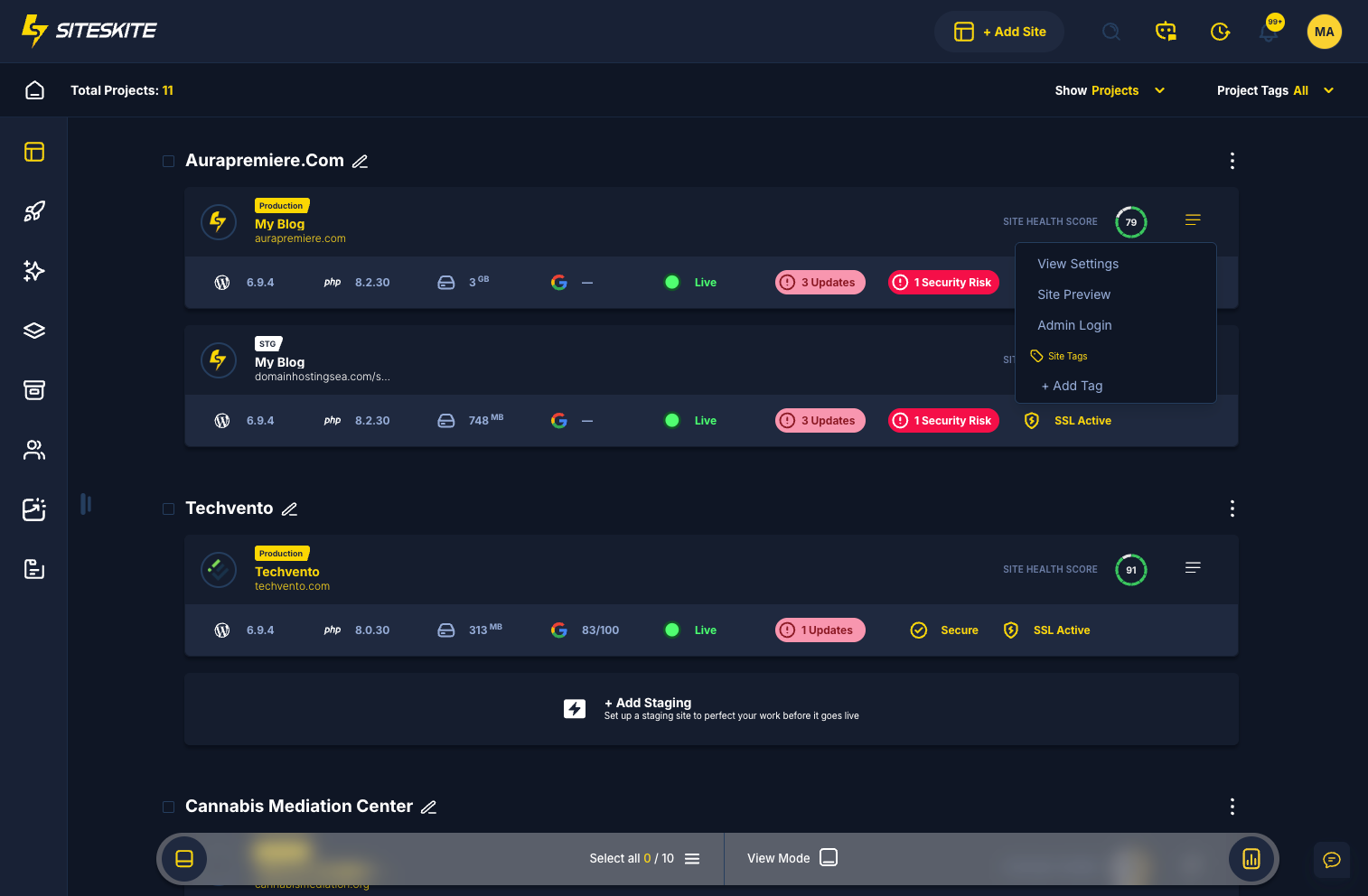
Skip password hunts and duplicate login screens. Once a site is linked, open Actions → Admin Login in the SiteSkite portal — secure token authentication drops you straight into wp-admin.
7-day trial · No credit card required
Why 1-Click Admin Login?
Agencies and operators touch many WordPress dashboards daily. SiteSkite removes the friction — without storing or sharing client credentials.
Instant wp-admin access
Go from the SiteSkite Sites list to the WordPress dashboard in one click — no username, password, or login URL to remember.
Secure token authentication
SiteSkite uses secure token-based login. WordPress credentials are not shared or stored in the portal.
Built for portfolios
Jump into any linked site quickly — ideal when you manage dozens of client sites from one operations layer.
What you get
Admin Login is available on every properly linked site with the SiteSkite Link Plugin active.
Actions → Admin Login
From the Sites section, select Actions on any linked site and choose Admin Login from the menu.
Direct to wp-admin
After secure authentication, you are redirected to the WordPress dashboard — ready to work immediately.
No credential storage
Your WordPress passwords stay with you. SiteSkite handles the session through encrypted API communication.
Requires linked site
The SiteSkite Link Plugin must be installed and active on the WordPress site for Admin Login to appear and work.
When teams use it
Everyday workflows where one-click access saves minutes across many sites.
Agencies
Support, dev, and content teams jump into client wp-admin without requesting or resetting passwords.
Support & maintenance
Fix plugin issues, review settings, or verify updates — open the dashboard and go.
Multi-site operators
Move across a large portfolio without keeping a password manager tab open for every domain.
How to use Admin Login
From SiteSkite portal to WordPress dashboard in a few clicks.
Open SiteSkite portal
Log in to your SiteSkite dashboard and navigate to the Sites section.
Find your website
Locate the linked WordPress site you want to access in your sites list.
Click Admin Login
Open the Actions menu on the right and select Admin Login from the options.
Land in wp-admin
SiteSkite authenticates your session securely and redirects you to the WordPress admin — no manual login required.
Secure by design
Admin Login relies on the same secure link between SiteSkite and your WordPress site as backups and remote management.
Security notes
Token-based authentication with no credential storage in SiteSkite — plugin must stay active on the linked site.
- Secure token-based authentication — not password sharing
- WordPress credentials are not stored in SiteSkite
- SiteSkite Link Plugin must be installed and active
- Works only on properly linked, connected sites
Troubleshooting tips
- Login button missing — confirm the site is linked and connected
- Failed login — check the SiteSkite plugin is updated and active
- Timeout error — verify the site is online and reachable
- Slow redirect — review caching or firewall rules on wp-json endpoints
1-Click Admin Login is included in your SiteSkite plan
Link your sites once — then open wp-admin from the portal alongside backups, monitoring, updates, and portfolio WebOps.
7-day trial · No credit card required