
Rankings slip quietly. See it before your client does.
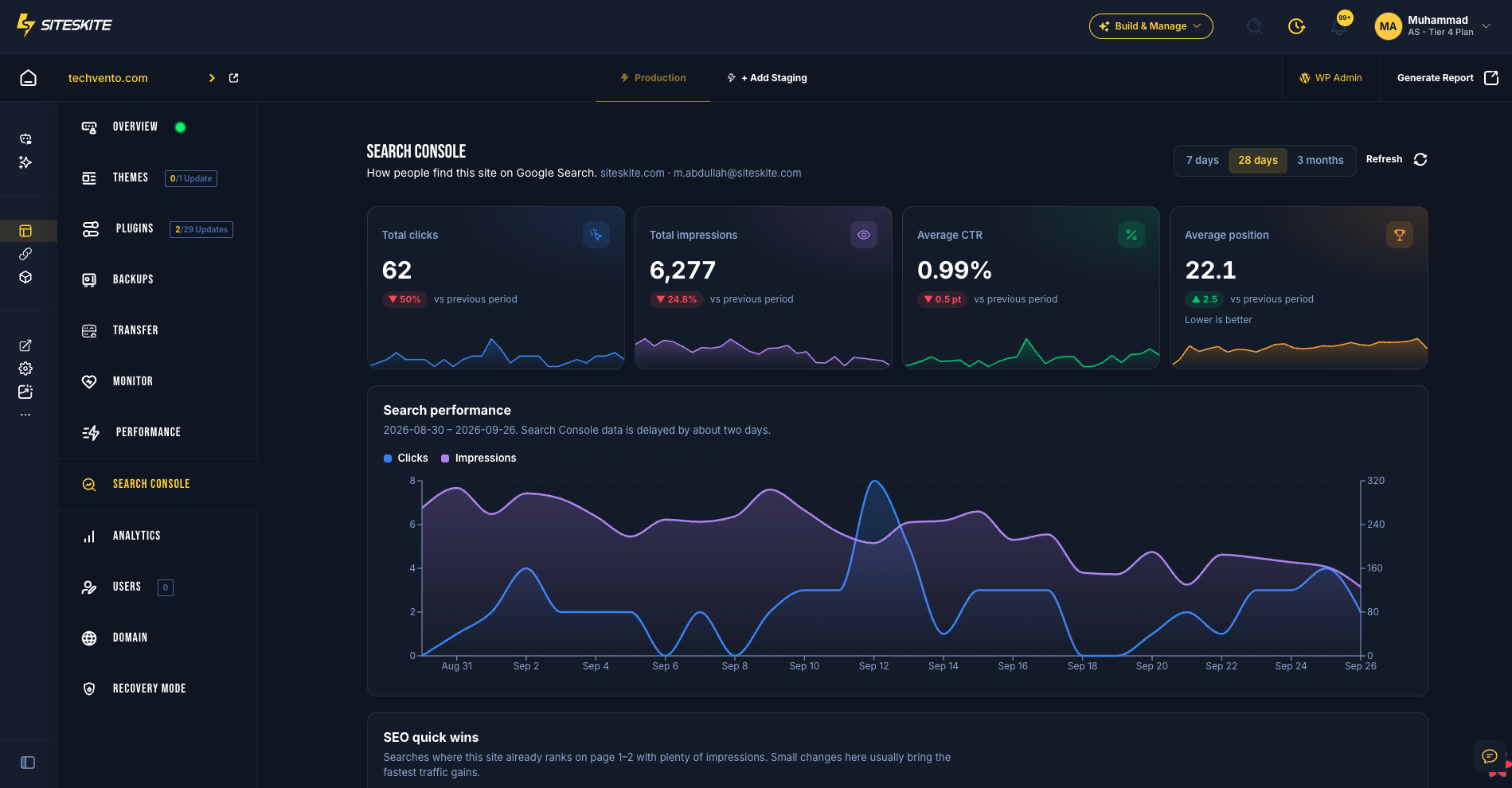
SiteSkite puts Google Search Console inside every linked WordPress site: clicks, impressions, CTR, average position, top queries, and the quick wins that are one tweak away from page one. You don't need extra logins, spreadsheet exports, or another SEO tool.
7-day trial · No credit card · Included on every paid plan
What flying blind in Google Search costs you
Rankings rarely collapse overnight. They slide, one position at a time, and by the time a client notices, you're already defending the retainer.
Silent ranking slides
A money page drifts from position 4 to 11 and loses most of its clicks. Without regular visibility, you hear about it from the client, not from your dashboard.
Traffic you earned but never claim
Queries on page two with thousands of impressions are the cheapest traffic you'll ever win. They stay invisible when nobody opens Search Console for every site.
Twenty logins, zero context
Switching Google accounts and properties per client burns billable time, and the data never sits next to the updates and fixes that caused it.
Reports that prove effort, not impact
Update logs show you were busy. Search clicks show you made a difference. Clients renew on impact.
The Monday-morning SEO check, two ways
Same portfolio, same week. One workflow gets skipped when things get busy. The other runs in minutes.
Without SiteSkite
- Open Search Console, switch Google accounts, hunt for the right property
- Export queries to a spreadsheet to find anything worth fixing
- Screenshot charts and paste them into a separate client report
- Repeat for every site, or quietly skip the ones you can't get to
With SiteSkite
- Open the site in SiteSkite. Search Console is already a tab
- Clicks, impressions, CTR, and position, each with a trend vs the previous period
- SEO quick wins flag page-one and page-two queries with estimated extra clicks
- Add the Search Console section to a report once and it fills itself every period
Everything in the Search Console tab
Built for the questions clients actually ask: are we growing, what are people searching for, and what should we fix next?
Four KPIs with trends
Total clicks, impressions, average CTR, and average position, each with a sparkline and the change vs the previous period. Position is marked lower-is-better, so green always means good.
Search performance chart
Clicks and impressions day by day across 7 days, 28 days, or 3 months, so you can line up a drop with the deploy or update that caused it.
SEO quick wins
Queries already ranking in positions 4–20 with above-average impressions, each labelled “Push to page 1” or “Improve title & description”, plus estimated extra clicks.
Top queries and top pages
The searches and URLs that drive clicks, with CTR and average position for each. Sort them in place without exporting anything.
Countries and devices
See which markets bring search traffic and whether mobile or desktop is carrying the site.
Set once per site
Pick the property once and SiteSkite remembers it for that site. The data loads automatically every time, and you can change or disconnect it whenever you like.
Your next ranking win is already in the data
The fastest traffic gains hide in queries you already rank for. SiteSkite surfaces them on every site automatically, so the next optimization you ship is the one with the biggest payoff.
- Queries in positions 4–20 with above-median impressions
- A clear next step: push the page to page one, or rewrite the title and meta description
- Estimated extra clicks, so you can prioritize by payoff instead of gut feel
- Recalculated for whichever date range you're viewing
From zero to search insights in four steps
No Google Cloud console, no API keys, no plugin to install on the client's site.
Open a linked site
Go to any linked WordPress site in SiteSkite and select the Search Console tab.
Sign in with Google
Approve read-only access. The same connection works for Search Console and Google Analytics.
Pick the property
Choose the domain or URL-prefix property. If a GA4 property matches the same domain, SiteSkite links it automatically.
Put it in your reports
Add the Search Console section to a report profile. Sites without Search Console are skipped automatically.
What this looks like on a real retainer
The situation
An agency maintains 18 WordPress sites on monthly care plans. The search data lives in 18 Search Console properties spread across four Google accounts, so nobody checks it until a client asks why leads are down.
With SiteSkite
With Search Console connected in SiteSkite, the team reviews every site's clicks and positions from the same place they run updates and backups. Quick wins become a monthly “SEO boost” line item, and the white-label report now shows search growth next to the maintenance log.
- One place to check search health across the portfolio
- A billable SEO task list built from real Google data
- Reports that tie maintenance work to search results
Search Console in WordPress management tools: who actually has it?
Most maintenance dashboards stop at uptime and updates. Here's how SiteSkite compares on Google search and traffic data.
| Platform | Search Console | Google Analytics 4 | In client reports | Setup |
|---|---|---|---|---|
| SiteSkite | Included: Built in on every linked site | Included: Built in on every linked site | Included: Both, in white-label reports | Included: Sign in with Google, no Cloud project |
| ManageWP | Not available: No native integration | Included: Included | Paid add-on or extension: GA only, via Client Report add-on | Included: Sign in with Google |
| MainWP | Paid add-on or extension: Pro extension | Paid add-on or extension: Pro extension | Paid add-on or extension: Via Pro extensions | Limited: Your own Google API project or JSON key |
| Modular DS | Included: Included | Included: Included | Included: Both, in reports | Included: Sign in with Google |
| WP Umbrella | Not available: Not available (open feature request) | Included: Included | Limited: GA4 only | Included: Sign in with Google |
| WP Remote | Not available: No native integration | Included: Included | Limited: GA4 only | Included: Sign in with Google |
| WPMU DEV | Limited: Beehive plugin, inside each wp-admin | Limited: Beehive plugin per site; the Hub uses its own tracker | Limited: Built-in WPMU DEV analytics, not GA4 | Limited: Plugin configured on each site |
| InfiniteWP | Paid add-on or extension: Paid add-on, crawl errors only | Paid add-on or extension: Paid add-on | Paid add-on or extension: GA via Client Reporting add-on | Limited: Your own Google Cloud OAuth credentials |
| InstaWP | Not available: Not available | Not available: Not available | Not available: No Google data in reports | Not available: Install Site Kit on each site |
Based on each vendor's public documentation and pricing pages, reviewed September 2026. Products change — check the vendor's site for current details.
Where the alternatives fall short
Search data only helps if your team can actually get to it. Here's where the alternatives get in the way.
No Search Console at all
ManageWP, WP Umbrella, WP Remote, and InstaWP have no native Search Console integration, so you're still logging in to Google separately for every site.
Bring your own Google Cloud project
MainWP and InfiniteWP ask you to create API credentials in Google Cloud before any data shows up. That's setup homework most teams never finish.
Stuck inside wp-admin
Plugin-based options like WPMU DEV's Beehive or Google Site Kit show data inside each site's dashboard, not across the portfolio you manage.
Data without the operation
Even tools that match on reporting stop there. You get no sandbox to test the fix, no BYO cloud backups, and no AI Site Studio in the same plan.
Search data is one layer. The rest of the operation comes with it.
Tools that stop at reporting leave you paying for staging, backups, and AI elsewhere. In SiteSkite, the Google data sits beside the work that moves it.

Google Analytics 4
Users, sessions, engagement, channels, and top pages, linked automatically when the domain matches.
Learn more
Page Speed Performance
Core Web Vitals next to your search and traffic data, so a slow LCP never hides behind a ranking drop.
Learn more
White-label Reports
Search and traffic sections sit beside updates, backups, and uptime in one branded report your clients actually read.
Learn more
Sandbox Sites
Test the title rewrite, the new section, or the plugin change on a sandbox before it touches a ranking page.
Learn more
AI Site Studio
Go from a brief to an editable WordPress theme on its own sandbox. None of the dashboards above include it.
Learn more
Bring Your Own Cloud Storage
Back up to your client's own S3, Google Drive, or Dropbox instead of a vendor-locked bucket.
Learn moreRead-only. Encrypted. Revocable.
Your clients' search data deserves the same care as their backups.
How SiteSkite handles Google data
SiteSkite asks for the minimum access needed to show your data, and nothing more.
- Read-only Search Console access, so SiteSkite can't change properties, sitemaps, or settings
- OAuth tokens encrypted at rest. Your Google password never touches SiteSkite
- Used only for your dashboards and reports. Never sold, never used for ads, never used to train AI models
- Disconnect the Google account and SiteSkite revokes access with Google and deletes the connection
Built for
- Agencies that need to show SEO impact, not just maintenance activity
- Freelancers who want to upsell SEO work backed by real query data
- In-house teams running several brand or regional sites
- Site owners who want search health without learning Search Console
Stop guessing why traffic moved.
Search Console is included on every paid SiteSkite plan, alongside Google Analytics 4, white-label reports, backups, monitoring, sandbox staging, and AI tools. Start a trial and connect your first site in minutes.
7-day trial · No credit card required · Not included on the Free plan