Review Update Copilot scores
Check risk insights and smart rules before bulk updates — safe updates with rollback are included on every PRO plan.
Modular DS flowSolutions by role
Use cases
Migration & recovery
Industries
Automation & AI
Control & ops
Reliability
Infrastructure
Launches, upgrades, and newsletter-style stories about what we shipped on the platform.
Read the news


SiteSkite vs Modular DS
Modular DS is a modern cloud dashboard for bulk updates, Patchstack-powered security, EU-hosted backups, and client reports — with flat plans from $19/month. SiteSkite is the WebOps platform for agencies that want sandbox staging, BYO cloud storage, and portfolio-wide ops without platform-locked backup buckets.
Try SiteSkite free7-day trial · No credit card · Run alongside Modular DS while you evaluate
Move from a maintenance dashboard to a WebOps layer with staging, recovery, and team workflows built in.
Updates, backups, staging, monitoring, reporting, and AI — without plan caps, overage math, and add-on stacks.
Modular DS scales on Freelance through Enterprise tiers — SiteSkite plans map cleanly to portfolio size with sandbox and BYO storage included.
The operational gap
Flat plans from $19/month with all core features included — but backups stay on Modular DS EU storage and staging is not part of the stack.
Built for agencies that outgrow maintenance dashboards — environments, automation, recovery, and team workflows in one cloud workspace.
Modular DS covers maintenance well — safe updates with Update Copilot, incremental EU backups, Patchstack vulnerability alerts, and polished client reports in one cloud dashboard. That works until you need sandbox staging before production, backups in the client's own cloud, or WebOps tooling beyond maintenance mode and database cleanup.
What it actually feels like when you push plugin updates across 25 client sites.
Check risk insights and smart rules before bulk updates — safe updates with rollback are included on every PRO plan.
Modular DS flowOpen one dashboard — uptime, SSL, and incidents are visible before you touch anything.
SiteSkite flowInstall, activate, or update plugins and themes across one or many sites from a single dashboard view.
Bulk managementSpin a sandbox or staging link to validate the update batch without touching production.
Built-in stagingSafe updates roll back on failure, but staging copies need a server you provide and set up, outside the update flow.
Bring your own serverPush updates with rollback ready; WP Essentials reapplies your standard plugin stack.
Included rollbackScheduled full or incremental backups restore from Modular DS — data stays on platform-managed EU infrastructure.
Platform storageBackups run on schedule — optionally in the client's own S3, Drive, or Dropbox.
BYO storageSchedule white-label reports with Google Analytics, Search Console, WooCommerce, and PageSpeed data baked in.
Included reportsPush a white-label report with Search Console, GA4, and Core Web Vitals from the same workspace your team and clients already use.
Included reportsNot checkmarks on a spec sheet — capabilities that change how agencies deliver work.

Turn a brief into a real WordPress FSE theme — generate multiple concepts, refine with AI chat, and deploy to Sandbox. Modular DS has no equivalent prompt-to-theme workflow.
Learn More
Launch isolated WordPress environments in seconds. Test plugin batches and theme changes before they hit a client domain — with production and staging links built in.
Learn More
Backup and restore to your client's S3, Google Drive, or Dropbox. Keep data where your clients expect it — not locked in vendor buckets.
Learn More
Deploy your agency's standard plugin stack to one site or fifty with a single action. Standardize client projects without repetitive manual installs.
Learn More
Save fully configured site setups and launch repeatable environments from templates — for new builds, demos, QA, and rapid project delivery.
Learn More
Operate sites without SSH — debug settings, maintenance mode, error logs, and more from one dashboard. Connect AI agents via SiteSkite MCP when you are ready.
Learn More
Invite admins, team members, and customers with scoped permissions. Everyone gets the access they need — without sharing dashboard credentials.
Learn More
Smart, safe, and automated

Reliable backups you can trust
Test changes without risk

Uptime, performance, and real-time alerts
Prompt-to-WordPress — competitors don't offer this

White-label reports that impress
What Modular DS includes across its Freelance, Starter, Business, and Enterprise plans — versus the WebOps capabilities SiteSkite adds on every paid tier.
| Capability | Modular DS | SiteSkite |
|---|---|---|
| Client reports | ||
| Client reports | Included — weekly, monthly or quarterly PDF or web-link reports | Included on every paid plan — 7-step builder, 7 starting layouts, 15 merge fields, weekly, monthly or quarterly |
| Custom work log in reports | Limited — tasks with date and time spent; no status field | Included — up to 50 tasks per section with Done, In progress or Planned status, date and time spent, as cards or a table |
| Search & traffic data in client reports | Included — GA and GSC in reports | Included — Search Console & Analytics report sections |
| Report delivery log & retry | Limited — sent and opened data; failed sends are resent by hand | Included — every send logged, PDFs downloadable for 30 days, 90-day history, retry failed sends |
| Custom domains | ||
| Reports sent from your own domain | Included — verified domain with a fixed no-reply address | Included — verify up to 10 domains; SiteSkite's address covers you until DNS is verified |
| Demo sandboxes & visitor emails on your domain | Not available — no prospect demo sandboxes | Included — blueprint sandboxes and visitor login emails use your verified domain |
| White label | ||
| White-label the connector plugin | Business plan and up — rename the connector plugin | Included — plugin name, description, author and link, or hide it per site with Stealth Mode |
| Multiple branding profiles (one per agency or client) | Limited — per-site settings; no reusable profiles | Included — named profiles with a live WordPress preview, bulk-applied to any set of sites |
| Out-of-date branding detection | Not available | Included — flags sites still showing an old profile version and updates them in one click |
| Blueprints & demo sandboxes | ||
| Reusable site blueprints | Limited — clone a template site to a server you provide | Included — 5 to 70 blueprints by plan, public or private, launched in seconds |
| Prospect self-serve demo sandboxes | Not available | Included — visitors launch their own live WordPress copy from a public link; removed automatically on expiry |
| Branded launch page | Not available | Included — Classic, Showcase or Minimal layout, 7 colour themes, 6 highlights, 8-image gallery, live preview |
| Lead capture & email verification | Not available | Included — optional or required email, 6-digit code, disposable-address blocking, one sandbox per email, consent checkbox |
| Launch funnel analytics | Not available | Included — five-step funnel from page visit to WordPress login, by source and campaign, over 7, 30 or 90 days |
| Lead sync to Mailchimp & webhooks | Not available | Included — Mailchimp plus 5 HMAC-signed webhook events with a 50-delivery log |
| Tracked share links & embed button | Not available | Included — tagged links per channel (utm_source supported) and a branded embed button |
| WP Canvas: site controls without wp-admin | ||
| Search indexing, comments & revisions | Limited — avoid indexing only while maintenance mode is on | Included — switch indexing and comments on or off, set the post revisions limit |
| WordPress debug switch | Not available | Included — one switch, no wp-config editing |
| Log viewer | Not available — critical-error alerts only | Included — searchable debug, PHP error and custom logs for each site |
| Enable or disable every plugin at once | Included — bulk activate or deactivate | Included — one click, with SiteSkite kept active so you can track down conflicts |
| Purge all caches | Included — clear cache for most popular cache plugins | Included — finds cache plugins, server caches and the object cache, and clears them together |
| Database cleanup & optimization | Included — 11 cleanup options, in bulk | Included — revisions, drafts, spam, trash and expired data, plus table optimization |
| Maintenance & coming-soon page designer | Limited — title, description and background colour; no templates | Included — 4 templates with your title, message, colour, and contact and social links |
| Analytics tags & search engine verification | Not available — analytics used for reports only | Included — GA4, Tag Manager, Meta Pixel, Clarity; Google, Bing, Pinterest and Facebook verification |
| Header, body & footer code | Not available | Included — saved snippets in the head, right after the body opens, or before it closes |
| Database search & replace | Not available | Included — replace text across the database, such as an old domain or URL |
| Permalink structure | Not available | Included — change the URL structure from the dashboard |
| Security hardening switches | Add-on — Patch & Protect ($2.25/site/mo, PRO plans) | Included — hide WP version, block user enumeration, mask login errors, disable file editor, security headers, disable XML-RPC |
| Server & WordPress info report | Limited — technical health panel | Included — WordPress, server, PHP and extensions, database, media, directories and constants, ready to copy |
| Reset to a fresh WordPress install | Not available | Included — with a prompt to back up first |
| Maintenance, security & recovery | ||
| Bulk plugin & theme updates | Included — bulk install, update, activate, deactivate | Included — bulk updates with rollback |
| Safe updates with rollback | Included — safe updates on every PRO plan | Included — safe updates with rollback |
| Update risk scoring (Update Copilot) | Included — risk insights before applying updates | Included — update risk in BirdEye |
| Smart update automation rules | Included — condition-based update rules | Included — scheduled and automated updates |
| Scheduled backups | Freelance — weekly; Starter+ daily incremental (25–500 GB by plan) | Included — daily, weekly, or on-demand |
| Uptime monitoring | Included — 15-min (Freelance) to 2-min (Business+) | Included — 2-min intervals on Advanced |
| SSL certificate monitoring | Included — uptime SSL on every PRO plan | Included — SSL status & expiry in BirdEye |
| Staging environments | Included — staging copies on servers you provide | Included — sandbox & staging links |
| Sandbox updates | Not available — safe updates roll back on production only | Included — sandbox & staging links |
| Vulnerability scanning | Included — Patchstack alerts up to 48h before public disclosure | Included — malware scanning (no virtual patching) |
| Virtual patching (Patch & Protect) | Add-on — Patch & Protect powered by Patchstack | Not available — malware scanning only, no virtual patching |
| Portfolio security score | Limited — per-site health & vulnerability view | Included — per-site security score in BirdEye |
| PHP error & fatal error monitoring | Limited — performance and health alerts | Included — advanced PHP error tracking & alerts |
| Domain expiry monitoring | Not available | Included — domain expiry alerts in BirdEye |
| GDPR-compliant backup storage | Included — EU-hosted platform storage | Included — BYO cloud (S3, Drive, Dropbox) on your terms |
| Bring-your-own backup storage | Not available — platform storage only | Included — S3, Drive, Dropbox |
| Create sandbox from existing backup | Not available | Included — full clone for testing before production |
| One-click WordPress admin access | Included — secure login without stored credentials | Included — secure admin access |
| WordPress Multisite support | Included — manage network sites individually | Included — multisite in portfolio view |
| Plugin preset bundles | Not available | Included — WP Essentials |
| Team & client role access | Included — custom roles (1–10 users by plan) | Included — workspaces & invites |
| Search, analytics & AI | ||
| Google Search Console dashboard | Included | Included — clicks, CTR, position & SEO quick wins per site |
| Google Analytics 4 dashboard | Included | Included — users, sessions, channels & top pages per site |
| AI Site Studio (prompt-to-WordPress themes) | Not available | Included — FSE themes from prompts, AI refinement, Sandbox deploy |
| AI / MCP integration | Not available | Included — MCP & BYO LLM |
Modular DS uses flat plans by site count — all PRO features included, with overage if you exceed plan limits. SiteSkite plans map to portfolio size with sandbox staging and BYO cloud storage included.
Modular DS (monthly): Freelance $19 (10 sites, weekly backups), Starter $40 (35 sites), Business $69 (75 sites), Enterprise $112 (125 sites). Annual billing saves up to 17%. Overage available for extra sites, users, or storage. 14-day free trial. SiteSkite: Free ($0, 1 basic site), Advanced ($2.99/mo or $29.99/yr per Pro site), Professional ($75/mo or $750/yr, 30 sites), Agency ($175/mo or $1,750/yr, 70 sites). Totals below use Starter+ for daily backup parity.
$19/mo — Freelance (10-site cap); weekly backups — Starter $40 for daily
$14.95/mo — Advanced at $2.99/mo per Pro site (5 × $2.99)
Link 3–5 representative client sites. Keep Modular DS running on the rest — SiteSkite's plugin does not conflict.
Use the 7-day trial to test sandbox updates, backups, monitoring, and a client report on actual sites.
Move sites in batches when you are confident. Reach out via contact if you want help planning the transition.
The interface gap
Modular DS was built to maintain sites from a polished cloud dashboard. SiteSkite was designed so operators see the whole portfolio — status, risk, environments, and next actions — without plan-tier ceilings.
This is not a prettier skin on the same workflow. It is a different way to run WordPress at scale: fewer clicks to confidence, fewer surprises after deploy.
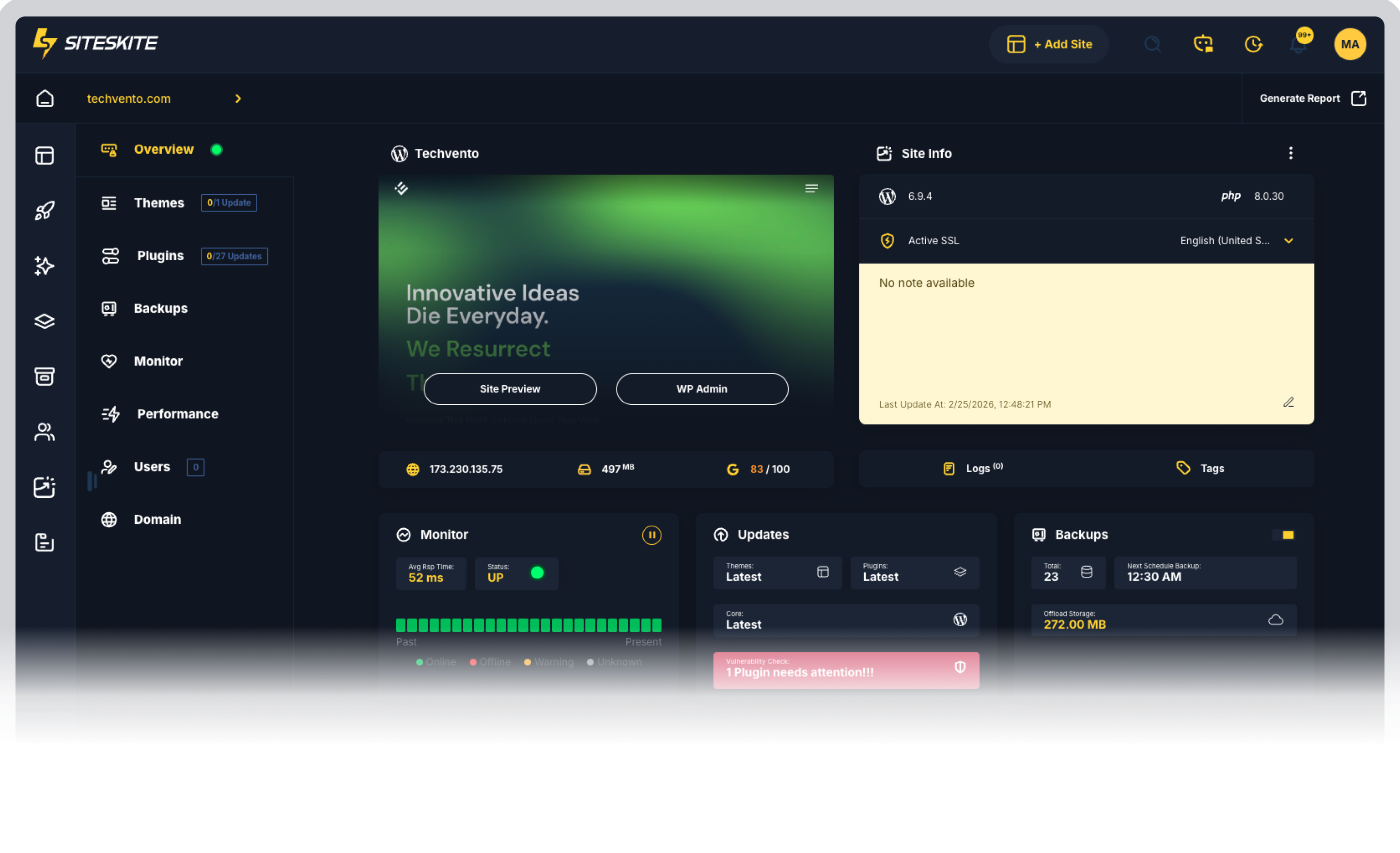
7-day trial · Connect a pilot batch in minutes
Your websites stay protected with automated updates, backups, and real-time monitoring.
One dashboard to handle all your WordPress sites—saving hours every week.
From single users to agencies, SiteSkite grows with your business needs.
Manage your WordPress sites smarter. Start your 7-day free trial and experience automated monitoring, backups, and full site control with SiteSkite.