
Your brand on every client WordPress site
Rebrand the SiteSkite Link plugin with your agency name, icon, and menu labels — so clients see your platform, not a third-party tool. Optional Stealth Mode keeps the connector protected from accidental deactivation.
7-day trial · No credit card required
Why white label the plugin?
Agencies and freelancers offering WordPress management should look like the platform — not reselling someone else's connector in wp-admin.
Build brand trust
Clients interact with your agency identity in WordPress — a seamless, professional experience that reinforces who owns the relationship.
Polished client experience
Hide third-party tool names and deliver a branded dashboard feel that looks like your own internal system.
Protect the connection
Stealth Mode keeps the plugin invisible in wp-admin so clients cannot accidentally deactivate or delete your management layer.
What you can customize
White label applies to the SiteSkite Link plugin and client-facing views — not the main SiteSkite portal dashboard.
Plugin name
Rename the SiteSkite Link plugin to your agency or product name — e.g. “Acme Site Manager”.
Plugin description
Add your own service description and internal notes so wp-admin copy matches how you talk to clients.
Icon & branding
Upload a custom plugin icon so the connector matches your logo and visual identity in WordPress.
Custom dashboard label
Change how the plugin appears in the WordPress admin sidebar — your menu name, your product.
Stealth Mode (optional)
Hide the plugin from the normal Plugins list entirely — invisible to everyday users while SiteSkite keeps working.
Branded plugin download
After saving, download a white labeled SiteSkite Link plugin build ready to install on client sites.
What is Stealth Mode?
An advanced white label setting for agencies who need the connector to stay active — without client visibility.
- Plugin does not appear in the WordPress Plugins list
- Clients cannot deactivate or delete it accidentally
- SiteSkite communication continues normally in the background
- Manage the plugin only through your SiteSkite portal when enabled
Built for client-facing teams
White label is especially valuable when WordPress management is part of your service — not a tool you expose.
Agencies
Present a fully branded maintenance platform — consistent identity from reports to the plugin clients see in wp-admin.
Freelancers
Look like a one-person ops team with a private, professional connector — without enterprise overhead.
Hosting & care teams
Package managed WordPress as your own product while SiteSkite runs backups, updates, and monitoring behind the scenes.
How to enable white label
Configure branding once in SiteSkite, then deploy your custom plugin build to client sites.
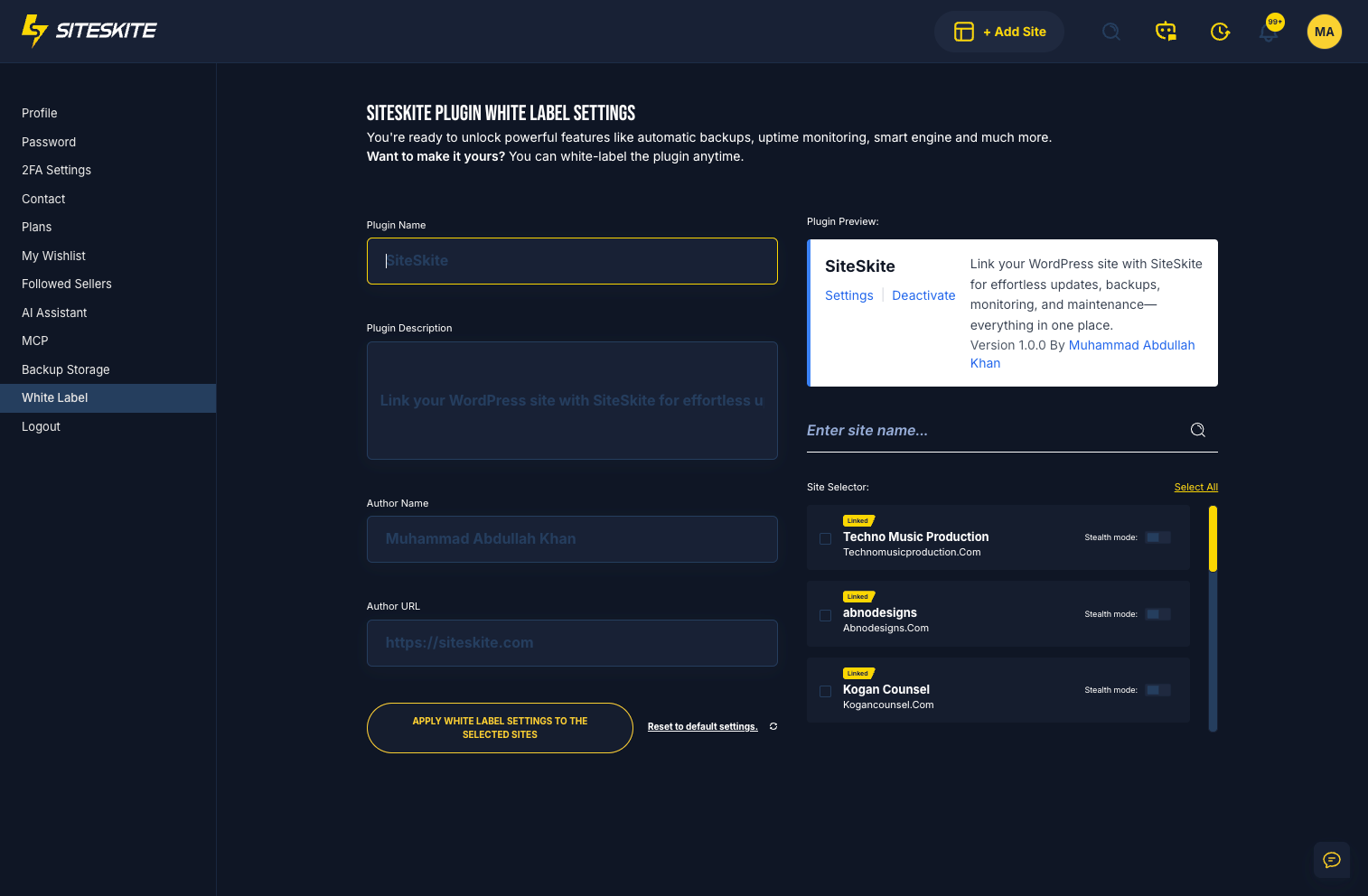
Open White Label settings
Log in to SiteSkite → Settings → White Label to open the branding configuration panel.
Add your branding
Set plugin name, slug, description, agency name, support email, icon upload, and sidebar menu label.
Enable Stealth Mode
Optional — toggle Stealth Mode to hide the plugin inside WordPress and prevent client tampering.
Save & deploy
Save settings, download the white labeled plugin, and install it on client sites — or apply branding to selected linked sites.
What to expect
White label customizes client-facing plugin branding — your SiteSkite portal stays unchanged for security and stability.
Important notes
Regenerate or re-download the custom plugin when branding changes so updates appear on existing sites.
- Applies to the SiteSkite Link plugin and certain client-facing views
- Does not alter the main SiteSkite dashboard
- Download a new white labeled build after changing settings
- Core SiteSkite functionality is unchanged — only branding in WordPress
Benefits at a glance
- Branding consistency — clients see your platform, not SiteSkite
- Professional client experience and stronger authority
- Stealth Mode helps prevent accidental plugin removal
- Better client trust with a private, internal-system feel
- Fully customizable labels and icon for your identity
White label is included in your SiteSkite plan
Brand the connector, protect it with Stealth Mode, and run the rest of your WebOps — backups, staging, monitoring, and reports — from one portal.
7-day trial · No credit card required