
Know the second something changes on your WordPress sites
SiteSkite Notifications go beyond portal toasts. Control Security Alerts for vulnerabilities and site changes, choose email recipients, and deliver the same alerts to Slack — so you know what happened before you open the dashboard.
7-day trial · No credit card required
Why notifications matter
When you manage many WordPress sites, you need immediate awareness of security risk and unexpected changes — not just confirmations after you click something yourself.
Real-time awareness
Get notified when a vulnerability appears or when core, plugins, or themes change across linked sites — even if someone else made the change in wp-admin.
You’re in control
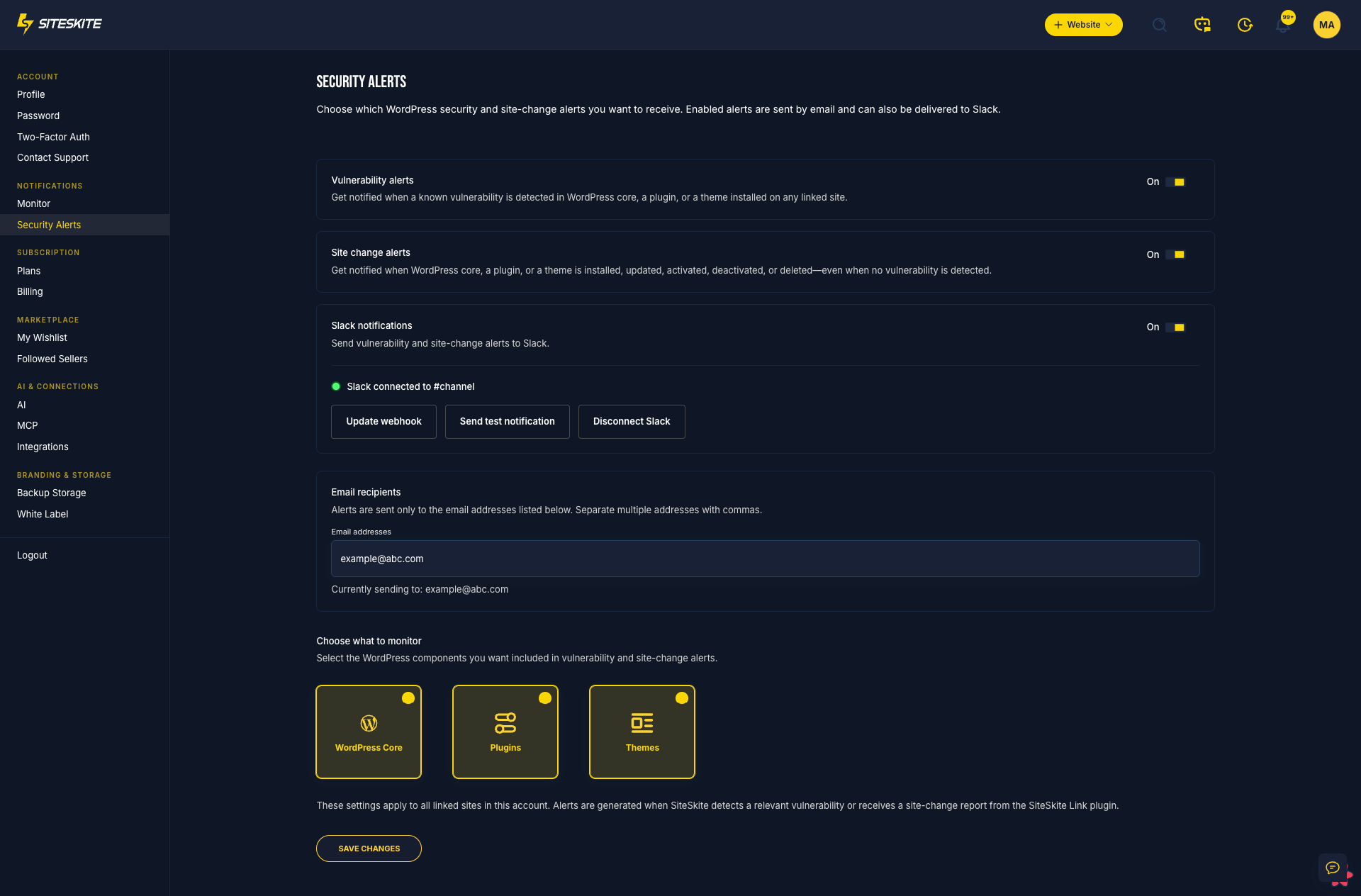
Toggle vulnerability alerts, site-change alerts, and Slack delivery. Choose whether Core, Plugins, Themes — or all three — should trigger notifications.
Email + Slack + portal
Send alerts to the inboxes you choose, mirror them into Slack, and still get instant toast feedback inside SiteSkite when you run maintenance yourself.
What SiteSkite can notify you about
Security Alerts and in-portal toasts cover both proactive risk signals and the maintenance work you run from SiteSkite.
Vulnerability alerts
Get notified when a known vulnerability is detected in WordPress core, a plugin, or a theme — so you can act before risk spreads across the portfolio.
Site change alerts
Alerts when core, plugins, or themes are installed, updated, activated, deactivated, deleted, or rolled back on linked sites.
Slack integration
Connect a Slack webhook, send a test notification, and route Security Alerts into the channel your team already watches.
Email recipients you control
Add one or more email addresses for Security Alerts — agency ops, a client contact, or a shared inbox — without sharing your SiteSkite login.
Choose what to monitor
Enable WordPress Core, Plugins, Themes, or any combination. Settings apply across linked sites from one Security Alerts page.
In-portal toast confirmations
While you work in SiteSkite, color-coded toasts still confirm updates, Smart Engine decisions, presets, and bulk maintenance — without blocking your workflow.
One settings page for vulnerability & site-change notifications
Open Security Alerts under Notifications to enable vulnerability alerts, site change alerts, and Slack delivery. Add comma-separated email recipients, connect or update a Slack webhook, and send a test notification before you rely on the channel.
Then choose what to monitor — WordPress Core, Plugins, and Themes — so alerts match the risk surface you care about across every linked site.
Open notifications documentationToast notifications for the work you run yourself
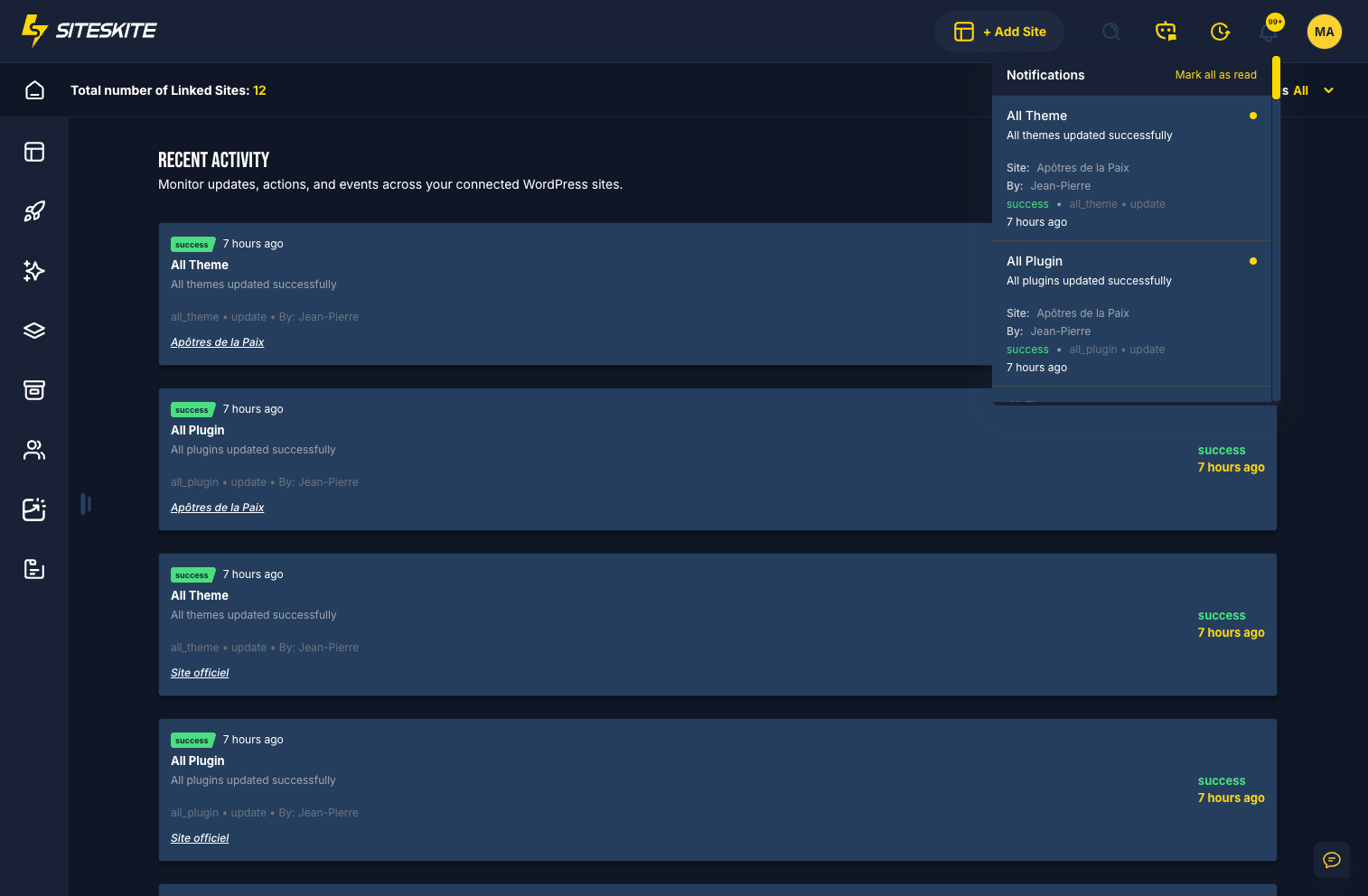
Security Alerts cover changes and vulnerabilities across the portfolio. Portal toasts still confirm the actions you take in SiteSkite — updates, Smart Engine allow/block decisions, WP Essentials presets, and bulk tasks.
Success, warning/skipped, failed, and Smart Engine decisions appear as quick, color-coded pop-ups so you can keep moving without refreshing dashboards.
How alerts are delivered
Pick the channels your team already uses — then keep portal toasts for hands-on maintenance.
- Email — Security Alerts go to the recipients you configure on the settings page
- Slack — optional webhook delivery with connection status, test send, and disconnect
- SiteSkite portal — toast pop-ups for actions you run inside the dashboard
- Scoped by component — Core, Plugins, and Themes controls apply to linked-site alerts
Built for busy ops teams
Especially valuable when multiple people maintain client WordPress sites — and not every change happens inside SiteSkite.
Agencies
Route Security Alerts to a shared inbox or Slack channel so support, security, and account managers see changes without sharing one login.
Solo operators
Catch unexpected plugin installs, risky updates, and vulnerability findings across many sites without checking every dashboard daily.
Security-minded teams
Pair vulnerability detection alerts with site-change notifications so risk and unexpected edits surface together.
How to set up Security Alerts
Configure once for your workspace, then get vulnerability and site-change alerts across linked sites.
Open Security Alerts
In SiteSkite, go to Notifications → Security Alerts to manage portfolio-wide alert preferences.
Enable the alerts you want
Turn on Vulnerability alerts, Site change alerts, and optionally Slack notifications.
Add email & Slack
Enter email recipients, connect a Slack webhook, and send a test notification to confirm delivery.
Choose Core, Plugins, Themes
Select which components to watch, save changes, and SiteSkite starts alerting when risk or changes appear.
Transparency by design
Notifications complement Vulnerability Detection, Smart Engine, monitoring, and reports — one WebOps layer for awareness and action.
What you get
Configurable Security Alerts plus instant portal feedback — not a separate product to stitch together.
- Vulnerability and site-change alerts by email and Slack
- Workspace controls for Core, Plugins, and Themes
- Email recipients and Slack webhook management in one place
- In-portal toast confirmations for maintenance you run in SiteSkite
Example alerts & confirmations
The kind of feedback SiteSkite can surface across Security Alerts and portal toasts.
- “Known vulnerability detected in plugin X on client-site.com.”
- “Plugin installed / updated / deleted on linked site.”
- “Theme activated” or “WordPress core updated.”
- Slack test notification after connecting your webhook.
- “Plugin X updated successfully.” / “Smart Engine: Update allowed.”
- “Smart Engine: This update is skipped for security reasons.”
Notifications are included in your SiteSkite plan
Combine Security Alerts, Slack delivery, Vulnerability Detection, Smart Engine, monitoring, and client reports — all from one WordPress WebOps layer.
7-day trial · No credit card required