
Know the moment a site goes down with SiteSkite Monitor
SiteSkite Monitor tracks online/offline status for every linked WordPress site with REST API checks and HTTP status monitoring — plus uptime history, response times, SSL validity, domain expiration, and downtime incidents from one dashboard.
7-day trial · No credit card required
Why SiteSkite Monitor matters
Agencies and operators managing many WordPress sites need downtime visibility before clients notice — without a separate uptime tool to configure for every project.
Real-time status updates
Know instantly when a linked site goes down — and when it recovers — without refreshing hosting panels or third-party monitors.
Portfolio-scale visibility
Bulk Monitoring gives a bird’s-eye view of every connected site so you can spot critical offline sites in one glance.
Evidence for clients
Uptime percentage, response-time charts, status history, and incident logs give you clear records for retainers and post-mortems.
Lightweight by design
Periodic checks do not affect site performance. Monitoring runs from SiteSkite — your WordPress install stays focused on serving visitors.
What you see on every Monitor page
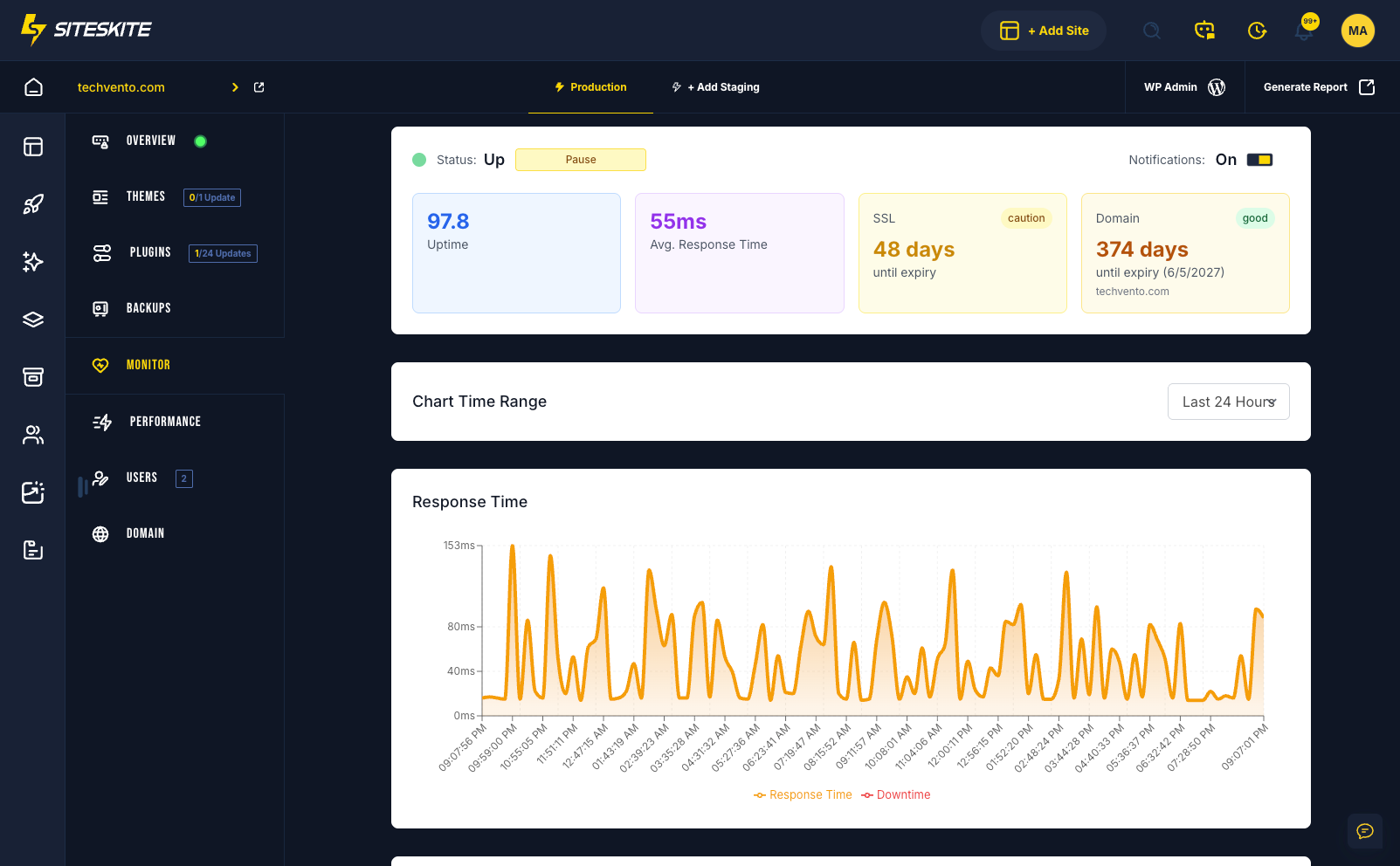
Open any linked site’s Monitor tab for a complete health snapshot — not just a simple up/down badge.
Status
Current online or offline state based on REST API and HTTP status checks.
Uptime
The percentage of time the website remained available over the monitored period.
Response time
Average response time with a chart of recent activity — spikes can signal load, network, or performance issues.
SSL expiry
Days remaining before the SSL certificate expires so you can renew before browsers warn visitors.
Domain expiry
Days remaining before the domain expires — catch renewals before a silent DNS failure.
Incident history
Recorded downtime events with total incidents, total downtime, average duration, and resolved status.
Bulk Monitoring for every linked site
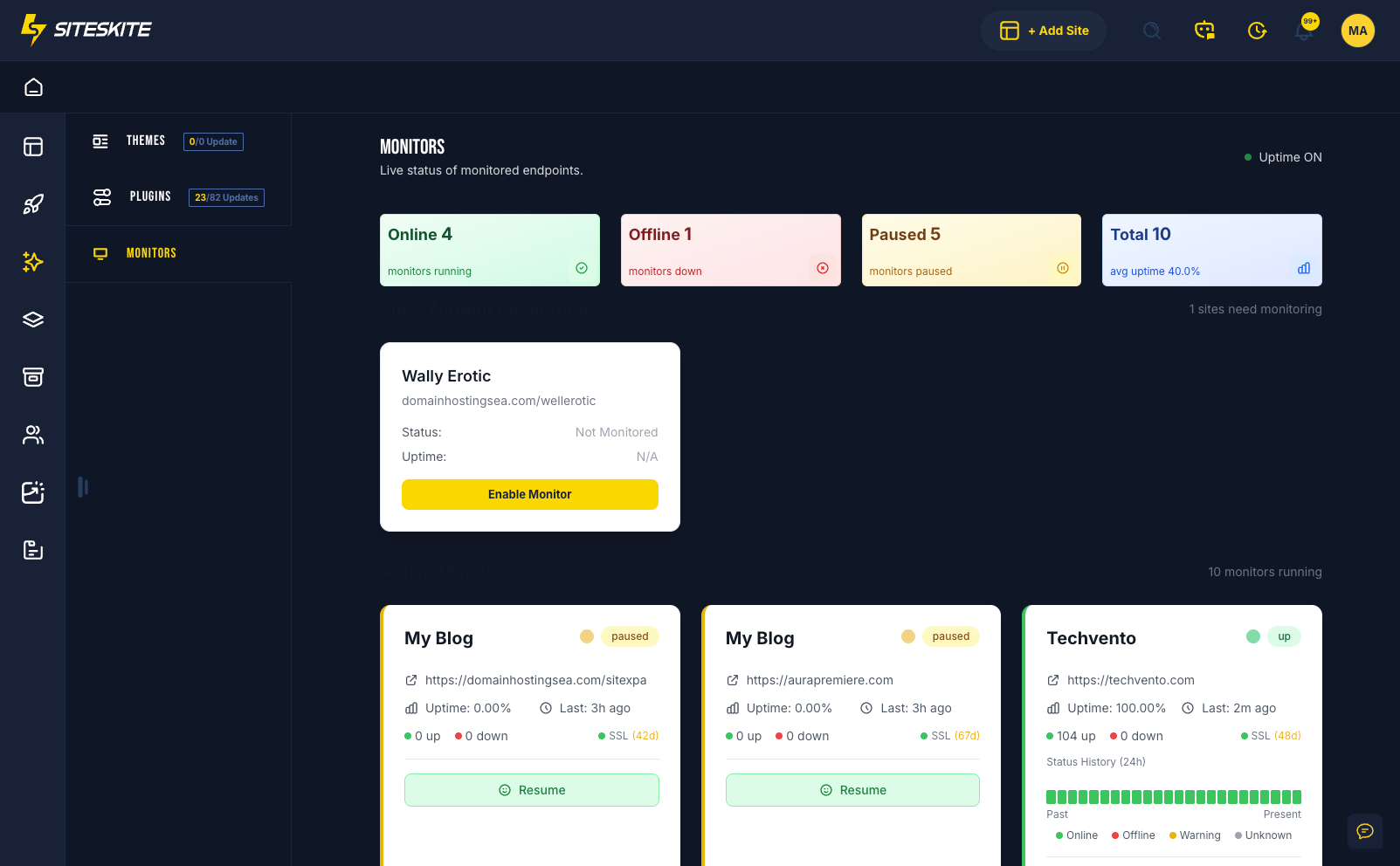
See online, offline, and paused status across your portfolio in one centralized view. Refresh all statuses in a click, pause or resume monitors quickly, and jump straight to the sites that need attention.
Ideal for agencies managing dozens or hundreds of WordPress sites — Bulk Monitoring turns uptime into a daily ops glance, not a per-site scavenger hunt.
How Bulk Monitoring worksControl alerts without losing visibility
Pause Monitoring stops availability checks for planned work. Notifications Off keeps checks running while silencing downtime emails for that site. Global Monitor Settings let you choose a notification delay — from no delay to 60 minutes — applied across all linked-site monitors.
Most teams land on a 5–10 minute delay to cut noise from brief interruptions while still catching real outages fast.
Manage monitoring & notifications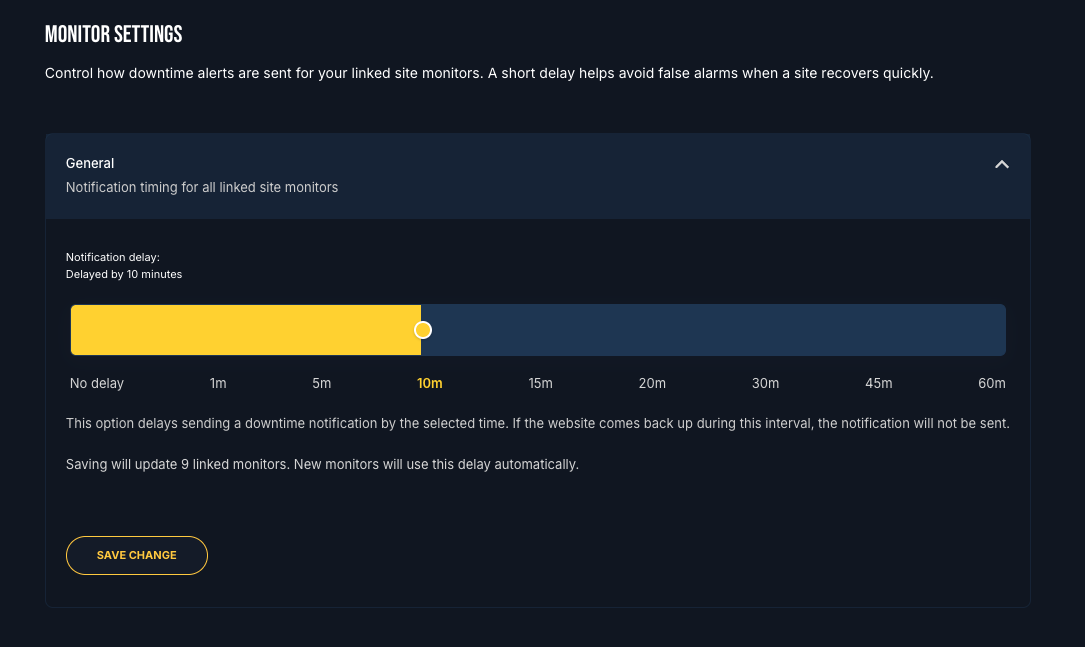
Status indicators at a glance
Color-coded signals across single-site Monitor views and Bulk Monitoring make portfolio health scannable.
Green — Online
The site is responding and available.
Red — Offline
The site is down or failing availability checks.
Yellow — Paused / Warning
Monitoring is paused, or the site is unreachable / in a warning state.
Grey — Unknown
Status could not be determined — check the SiteSkite plugin, REST API, and permalinks.
Monitor capabilities
Built for agencies that need actionable uptime ops — not another disconnected checker.
REST API & HTTP checks
Availability monitoring uses REST API checks and HTTP status monitoring for accurate WordPress-aware health signals.
Status & response history
Visual timelines show green, red, yellow, and grey periods so unstable windows are easy to spot.
Pause & resume per site
Pause monitoring during maintenance, migrations, or DNS work to avoid false downtime alerts — resume when ready.
Per-site notifications
Keep monitoring active while turning downtime alerts off for a single site when you need quiet observation.
Global notification delay
Set a portfolio-wide delay so brief blips do not flood your inbox — alerts send only if the site stays down past the delay.
Quick portal actions
Enable, pause, refresh, and manage monitors from SiteSkite — no need to log into WordPress for uptime control.
How to use SiteSkite Monitor
Enable monitoring once per linked site, then manage status, pauses, and alerts from the portal.
Open a linked site
Sign in to SiteSkite, open Linked Sites, and select the website you want to watch.
Enable Monitor
Open the Monitor tab and click Enable Monitor. Status updates appear in real time.
Review health details
Check uptime, response time, SSL, domain expiry, status history, and incident logs.
Pause or tune alerts
Pause during maintenance, toggle per-site notifications, or set a global notification delay.
Built for multi-site operations
Whether you protect one revenue site or an entire client portfolio, Monitor keeps downtime visible and actionable.
Agencies
Bird’s-eye Bulk Monitoring helps support and ops teams prioritize offline client sites before tickets pile up.
Critical websites
Use no delay or a 1-minute notification delay when every minute of downtime matters.
Planned maintenance
Pause monitoring during migrations, DNS changes, or major updates to avoid false downtime alerts.
Client retainers
Uptime, incidents, and response history support transparent reporting and faster post-incident reviews.
SSL & domain hygiene
Expiry countdowns help you renew certificates and domains before silent failures take sites offline.
Quiet observation
Disable notifications for a site while keeping monitoring active when you need data without inbox noise.
Best practices for reliable monitoring
SiteSkite Monitor is more than an uptime checker — it is a centralized dashboard for actionable insights, bulk visibility, and clearer client communication.
Requirements for accurate checks
Monitoring depends on a healthy connection between SiteSkite and your WordPress site.
- SiteSkite plugin installed and connected on the linked site
- WordPress REST API enabled for accurate monitoring
- Working permalinks so REST API communication succeeds
- Pause monitoring before planned downtime to prevent false alerts
Recommended habits
- Enable monitoring immediately after linking a site
- Pause during maintenance, migrations, and DNS changes
- Investigate Unknown statuses — usually REST API or permalink issues
- Use a 5–10 minute global delay for most business sites
SiteSkite Monitor is included in your plan
Pair uptime monitoring with Smart Engine, automated backups, Performance, Pretty Logs, and client reports — one WebOps layer for every linked WordPress site.
7-day trial · No credit card required